MCP · Workflow orchestration

CLIv4 stable

Make the agent think before it writes

The problem with AI coding agents is rarely that they cannot write code — it is that they skip the thinking. mcp-probe-kit turns "understand first, plan, then prove it is done" into a path the agent cannot route around: requirements become executable steps, every step leaves evidence, and nothing closes early.

npm i mcp-probe-kit
  • Runs locally — code never leaves your machine
  • MIT open source, no ads, no tracking
  • Free to use
convergeBLOCKED
requirements
✓ evidence
spec
✓ evidence
implementation
✓ evidence
tests
✓ evidence
review
✗ missing

cannot close: review evidence missing

It constrains the process, not the code

Requirements become executable steps

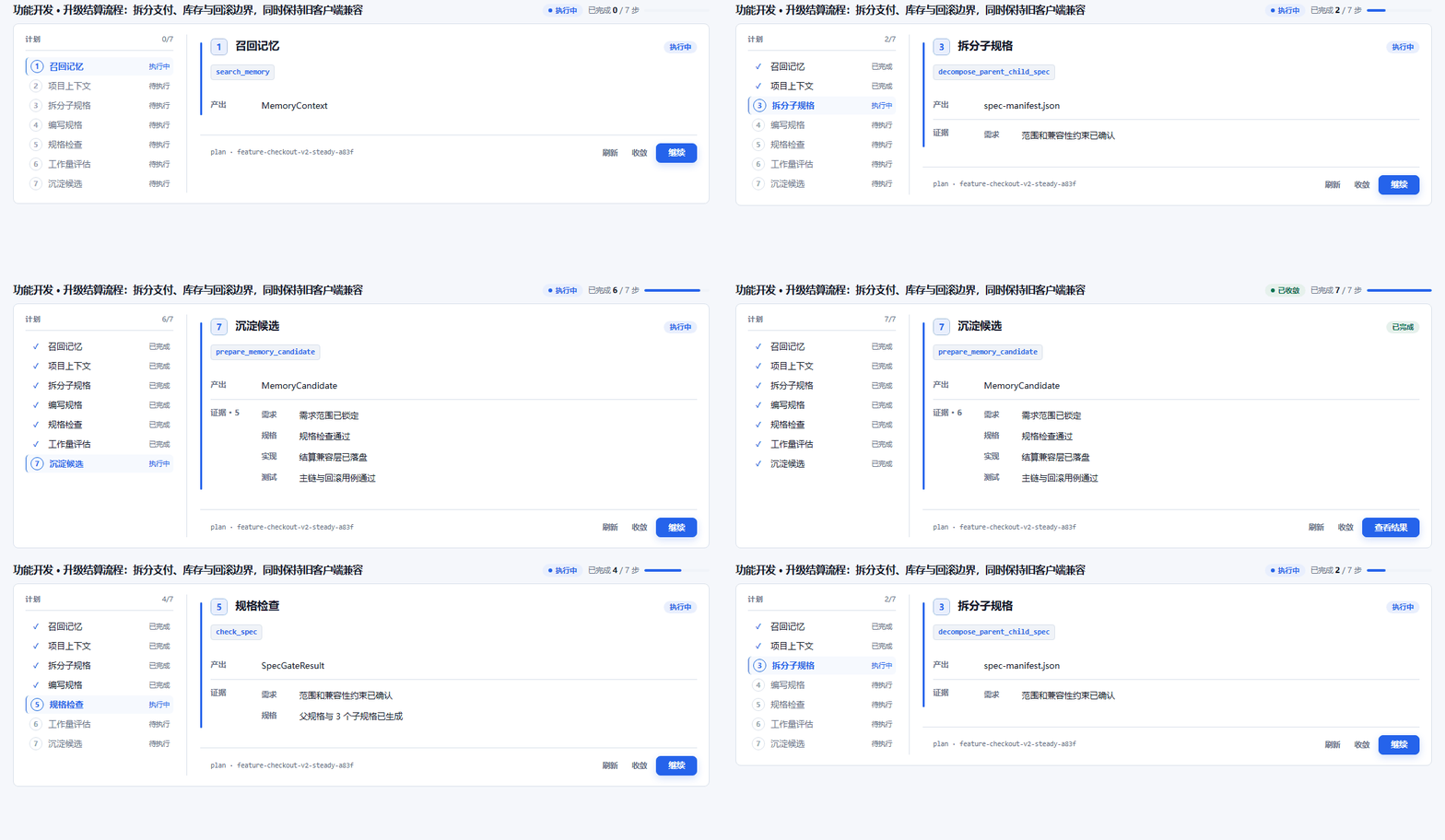
start_feature does not jump into writing code. It reads project context, refreshes the index, runs impact analysis, then breaks the requirement into tasks with acceptance criteria before handing them to the agent.

Interrupted plans resume where they stopped

plan_heartbeat persists completed, skipped and unresolved steps along with their evidence. After a dropped conversation, a restart, or a different agent, resume_plan recomputes what runs next.

Nothing closes half-done

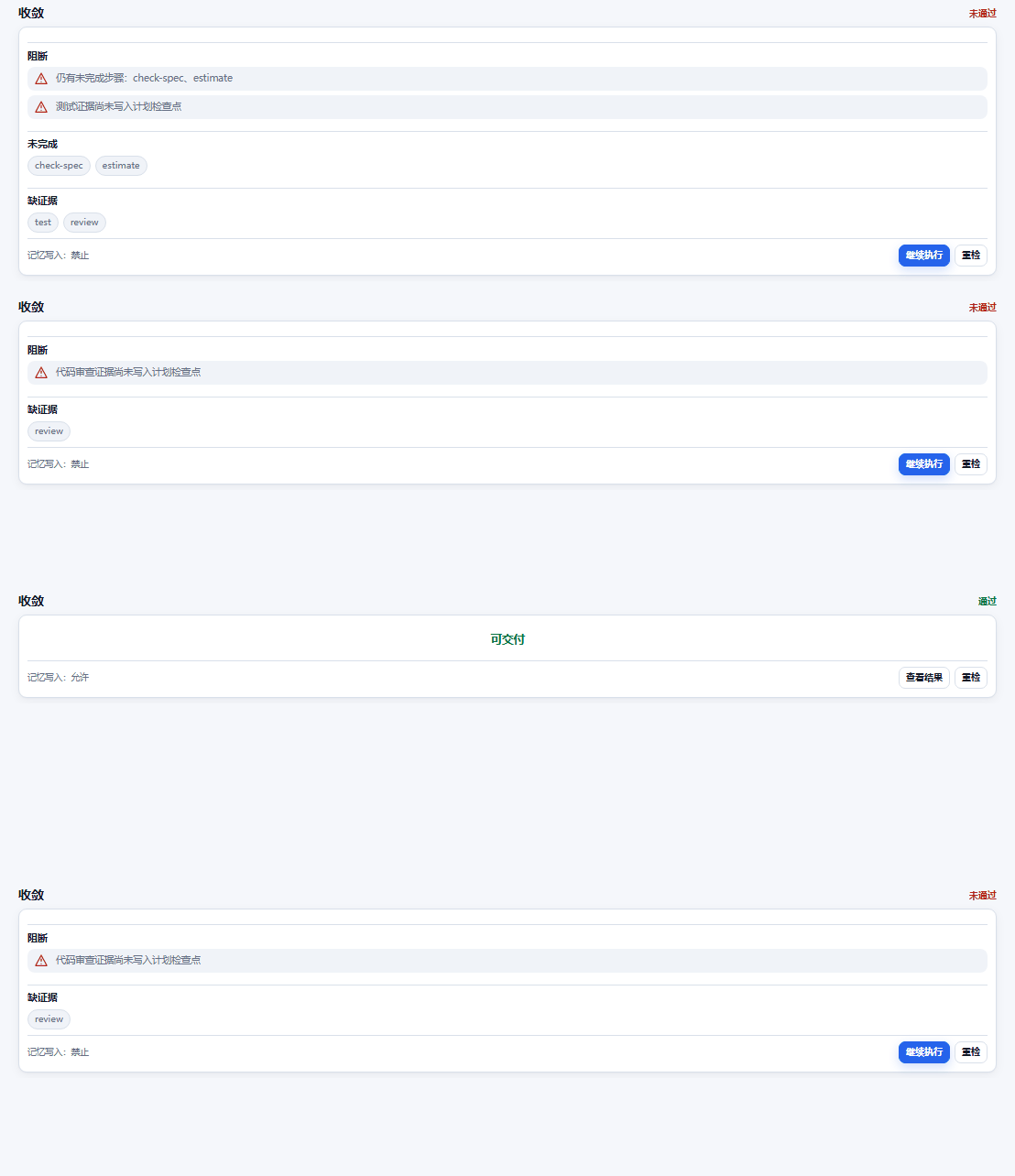
converge checks steps, unresolved items, and five kinds of evidence: requirements, spec, implementation, tests and review. If any is missing it refuses closure — "mostly done" does not pass.

Find the root cause before touching code

start_bugfix runs the SRC-8 eight-step root-cause protocol (inspired by Toyota TBP): reproduction contract, attribution layers, contributing factors. No code changes until the worksheet is closed.

Context survives new conversations

History Session is on by default and archives each turn — real user wording, decisions, open items — as local Markdown. A new chat picks up where the last one stopped, no vector database required.

Five visual workbenches

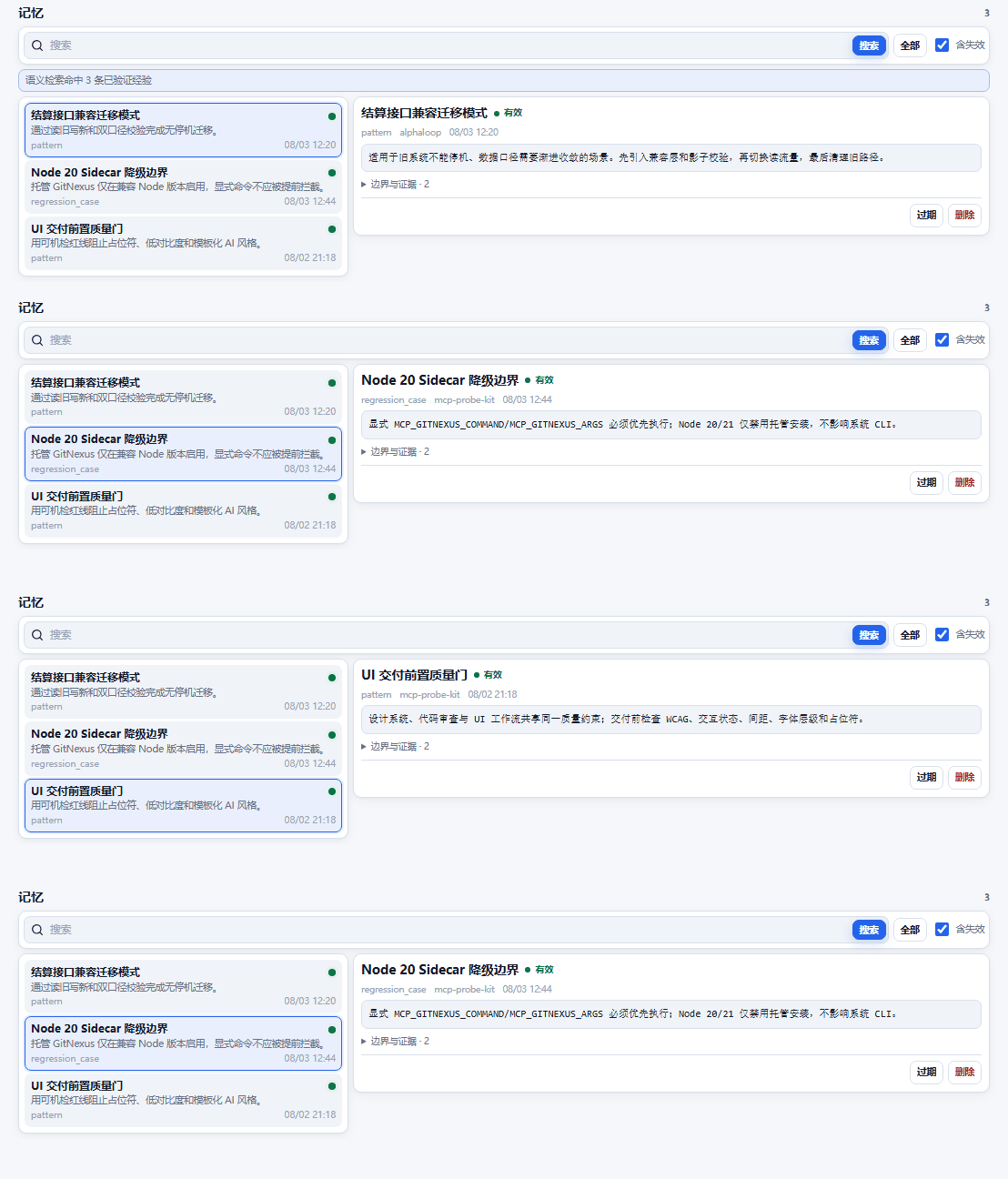
Native MCP Apps including Feature Workbench, Memory Center and Convergence Gate render plan progress, memory entries and convergence state right inside the client.
Connect in three steps

  1. [1/3]

    Add it to your client config

    Cursor, Claude Desktop, OpenCode and Cline are all supported. Paste one mcpServers entry pointing at npx -y mcp-probe-kit@latest.

  2. [2/3]

    First call bootstraps the rules

    Any tool call writes SKILL.md into the workspace and merges the mcp-probe block into AGENTS.md, so the agent knows which step to use and when.

  3. [3/3]

    Work the workflow

    Have the agent split requirements with start_feature, track progress with plan_heartbeat, and close with converge. 29 tools by default, 35 with memory configured.

Default tool surface

29 tools by default (24 base + 5 History Session), grouped by responsibility:

Orchestration
start_feature · start_bugfix · start_onboard · start_ui · start_product · start_ralph
Plan & converge
plan_heartbeat · resume_plan · converge
Project & spec
init_project · init_project_context · check_spec · estimate · architecture
Code & tests
code_insight · gentest · code_review · refactor · gencommit · git_work_report
History session
history_session_bootstrap · checkpoint · validate · search · read

What it looks like

These animations are rendered from the same MCP App source shipped in the npm package — not mockups.

Feature Workbench: parent-child specs, active step, outputs, evidence, cross-session recovery
Memory Center: semantic search, full-content inspection, lifecycle state, deletion
Convergence Gate: blocks closure when steps or evidence are incomplete

FAQ

Does it conflict with the agent built into Cursor?

No. mcp-probe-kit does not edit code or take over the filesystem. It orchestrates and validates: which workflow applies, how far execution got, whether the evidence is complete. Reading files, editing code and running commands stay with the client agent.

Do I need the memory stack?

No. The default 29 tools work out of the box and History Session needs no vector database. Only add Qdrant plus an embedding model if you want cross-project reusable experience — that raises the surface from 29 to 35 tools.

Which clients are supported?

Any standard MCP client: Cursor, Claude Desktop, Cline, OpenCode and others. Both legacy MCP and the 2026-07-28 protocol are supported. Node.js 20 or newer is required.

Does my data leave my machine?

No. The server runs as a local npx process, plan state lives under .mcp-probe-kit/ in your project, and history lives under docs/history-session/. The only external dependency is the optional memory service, which you host yourself.

Local-first — code and execution stay in your own environment.

MIT licensed · Node.js 20 or newer · ByteZoneX Lab →