
massCodeIODeveloper tools
massCode
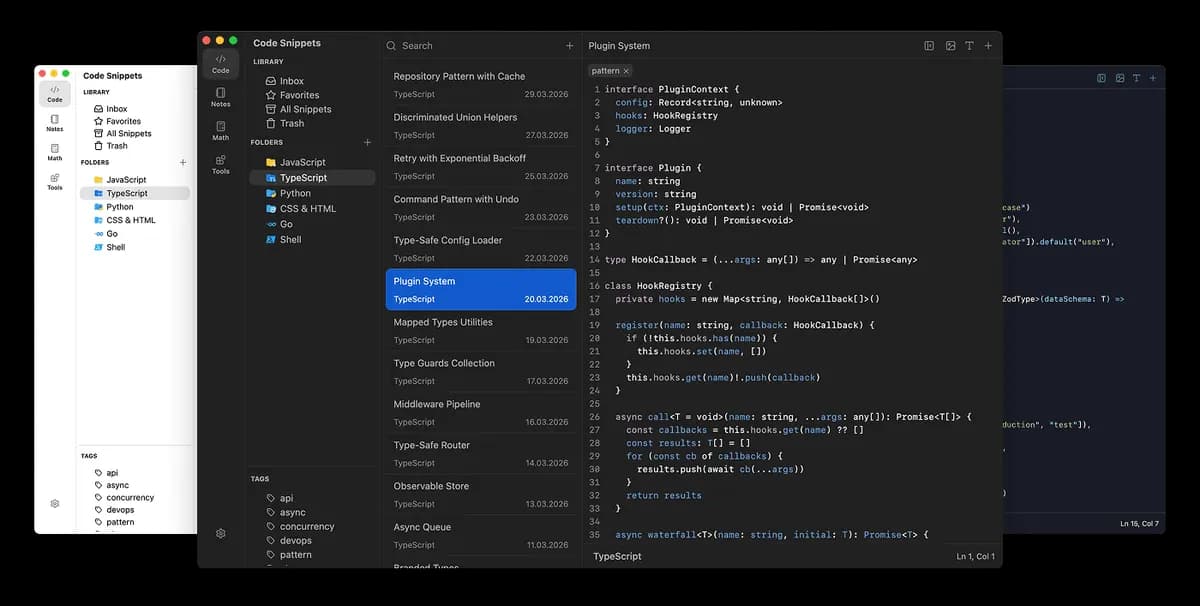
A local-first desktop workspace for snippets, Markdown notes, HTTP requests, calculations, drawings, and everyday developer utilities.
- Frontend
- Backend
- Full stack
- Productivity
- API debugging
- Desktop
- Windows
- macOS
- Linux
- Runs locally
- Popularity
- 7.0k Stars
- GitHub stars
- Recent activity
- 10/1/2026
- Updated in the last 30 days
- License
- AGPL-3.0
- Strong copyleft
Why it matters
We look beyond stars: what problem it solves, whether it creates real utility, and what makes its approach worth noticing.
Problem
Developers frequently scatter tasks across snippet managers, markdown notes, HTTP clients, and calculators, causing context switching. This project consolidates these high-frequency tools into a single local workspace.
Practical value
Offers high practical utility with a comprehensive feature set including syntax snippets, markdown notes with mind maps and presentation mode, an HTTP client with environment variables, a math notebook, a drawing canvas, and various dev utilities, all stored as local Markdown files.
Innovation / differentiation
The core innovation lies not in architectural breakthroughs, but in integrating fragmented developer tools—such as API clients, notes, and snippets—into a cohesive, local-first application with comprehensive import and clipping capabilities.
Leverage potential
Utilizes local Markdown files for storage, providing high data portability and allowing users to sync freely via Git, iCloud, or Dropbox without vendor lock-in.
Why now
The demand for local-first, privacy-respecting developer workspaces with reduced context switching remains steady and enduring.
Community activity
In the last 90 days there were 11 new issues and 83 pull requests; the bounded issue/PR samples include 10 issue authors and 5 PR contributors, with at least 7 releases.
Maintainer responsiveness
The 11-issue window sample had a 100% close rate, and the 83-pull-request sample had a 95% merge rate. Maintainer-response observations covered 100% of that issue sample, with a 55% response rate and median first response of 0.4 hours.
Key highlights
- Snippet folders, tags, fragments, broad syntax support, and Prettier formatting
- Markdown notes with tasks, link graph, Mermaid diagrams, and presentation mode
- HTTP client with environments, authentication, request preview, and response inspection
Quick start
How it is installed, how hard it is, and where to start.
Where it runs
Runs locally
Difficulty
Easy — follow the steps
- 01Download the build for macOS, Windows, or Linux from GitHub Releases.
- 02Choose or create a local Markdown vault for snippets, notes, and HTTP requests.
- 03Import existing Obsidian, Postman, Bruno, OpenAPI, or snippet data as needed, then use the command palette for navigation.
Best for
- Developers who want to try it on their machine
More about it
massCode has grown from a snippet manager into a local-first developer workspace. Snippets, Markdown notes, HTTP requests, calculation notebooks, and Excalidraw drawings live in the same desktop app and can be reached through a shared command palette. Content is stored as ordinary Markdown files with frontmatter, so users can version or sync the vault with Git, Syncthing, iCloud, Dropbox, or other file-based workflows instead of relying on a proprietary data store. The app also covers practical daily tasks such as environment-aware HTTP requests and response inspection, JSON visualization, Mermaid diagrams, formatting, encoding/hash/UUID utilities, and imports from sources including Obsidian, Postman, Bruno, and OpenAPI.
Sources
Each field shows its status and source — expand to review.
11 · Expand
Sources
Each field shows its status and source — expand to review.
capability tags
Verifiedproductivity, api_debugging
Source: admin_cms · cms editor · 8/17/2026
Latest release
Verifiedv6.0.0
Source: GitHub API · latest_release=v6.0.0 · 10/3/2026
License
VerifiedAGPL-3.0
Source: GitHub API · license.spdx_id=AGPL-3.0 · 10/3/2026
needs api key
VerifiedNo
Source: admin_cms · cms editor · 8/17/2026
One-liner
Verified{"en":"A local-first desktop workspace for snippets, Markdown notes, HTTP requests, calculations, drawings, and everyday developer utilities.","zh":"本地优先的开发者桌面工作台,把代码片段、Markdown 笔记、HTTP 请求、计算和绘图放在同一套文件库里。"}
Source: admin_cms · cms editor · 8/17/2026
Platforms
Verifiedwindows, macos, linux
Source: admin_cms · cms editor · 8/17/2026
Category hint
Inferred from materialssecurity
Source: Project README · hint=security · 8/17/2026
product forms
Verifieddesktop
Source: admin_cms · cms editor · 8/17/2026
role tags
Verifiedfrontend, backend, fullstack
Source: admin_cms · cms editor · 8/17/2026
supports local
VerifiedYes
Source: admin_cms · cms editor · 8/17/2026
supports self host
VerifiedNo
Source: admin_cms · cms editor · 8/17/2026
Related projects
Other verified projects matched by category, capabilities, and intended roles.
cli-printing-press
Automatically generates agent-optimized Go CLI tools and MCP servers by reading API documentation or sniffing web traffic.
spec-kit
An open-source CLI toolkit for Spec-Driven Development that guides AI coding agents through structured specification, planning, and code generation steps.
Flare
A graph-first IDE for agentic coding featuring a live codebase map, integrated terminal, and MCP task collaboration.
massing
Open-source, self-hosted, IFC-native AEC platform featuring in-browser BIM modeling, a general contractor portal, and development proforma tools.
CLI-Anything
A toolkit for generating and managing agent-callable CLIs for existing software, with CLI-Hub, generation workflows, and skill/plugin integrations.
WSL
Windows Subsystem for Linux allows you to run Linux command-line tools and applications directly on Windows without the overhead of a traditional virtual machine.