
netease-youdaoAI apps
LobsterAI
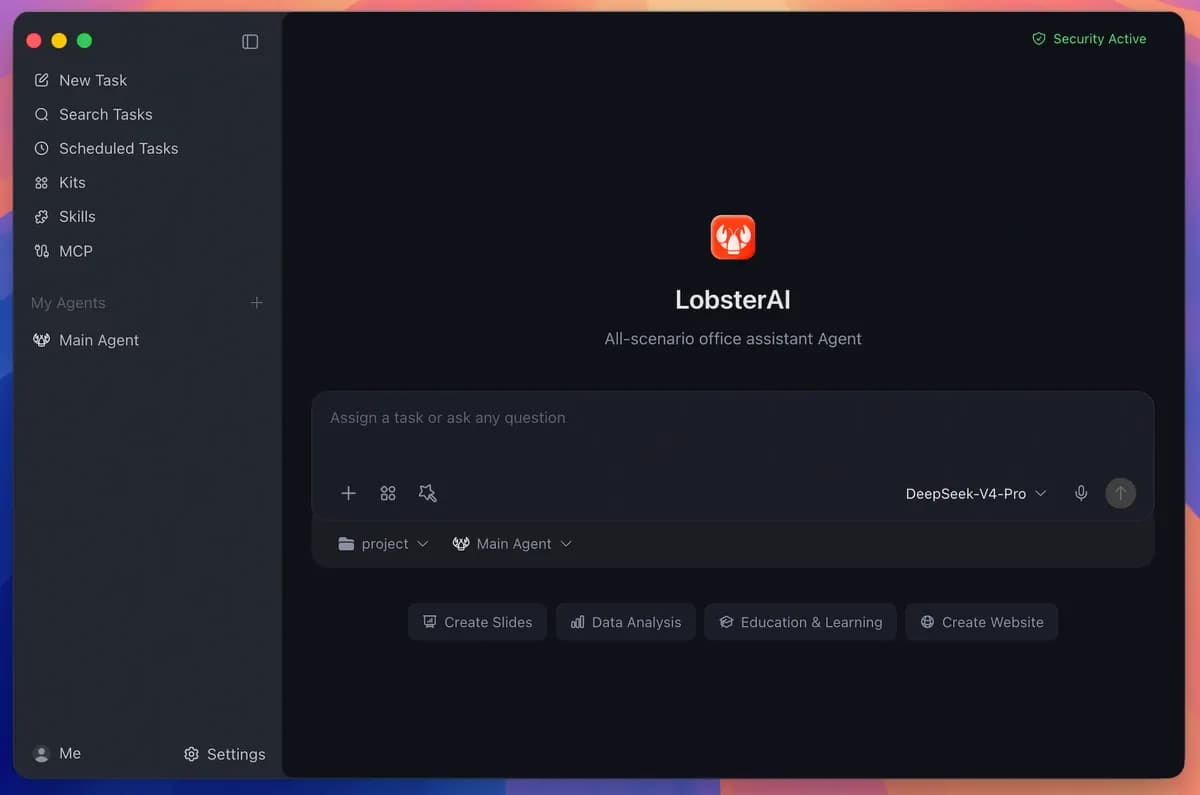
A desktop agent for local files, terminal, browser, and office workflows with multi-agent setup, skills, MCP, scheduled tasks, and IM remote control.
- Product
- Operations
- Automation
- Content creation
- Productivity
- Desktop
- Windows
- macOS
- Runs locally
- Popularity
- 6.1k Stars
- GitHub stars
- Recent activity
- 10/1/2026
- Updated in the last 30 days
- License
- MIT
- Permissive
Why it matters
We look beyond stars: what problem it solves, whether it creates real utility, and what makes its approach worth noticing.
Problem
Traditional desktop office applications heavily rely on manual operations, lacking an execution layer that directly bridges local files, terminals, browsers, and office documents.
Practical value
By integrating multi-agents, 28 built-in skills, MCP extensions, scheduled tasks, and mainstream IM remote control, it practically handles long-running, cross-application office and automation workloads.
Innovation / differentiation
Adopts an architecture separating the desktop Cowork UI from the OpenClaw runtime, maintaining local persistence, permission control, and approval mechanisms while decoupling underlying agent execution logic.
Leverage potential
Supports desktop execution on Windows and macOS while enabling remote control through IM channels such as WeChat, WeCom, DingTalk, and Lark, extending the reach of local agents.
Why now
Desktop AI agents are shifting from chat assistants to system-capable utility tools, making an open-source, multi-modal, and permission-controlled local solution timely.
Community activity
In the last 90 days there were 34 new issues and 493 pull requests; the bounded issue/PR samples include 23 issue authors and 6 PR contributors, with at least 24 releases.
Maintainer responsiveness
The 34-issue window sample had a 21% close rate, and the 89-pull-request sample had a 98% merge rate. Maintainer-comment observations covered only 24% of that issue sample, so response rate and first-response speed are not reported.
Key highlights
- Work with local files, terminal commands, browsers, documents, spreadsheets, and presentations
- Create multiple agents with separate models, skills, working directories, and IM bindings
- Ships with 28 built-in skills and supports external MCP servers
Quick start
How it is installed, how hard it is, and where to start.
Where it runs
Runs locally
Difficulty
Easy — follow the steps
- 01Download the macOS or Windows installer from the LobsterAI website or GitHub Releases.
- 02Launch the application and configure the model and main agent you want to use.
- 03Enable built-in skills, Expert Kits, or add MCP servers for the workflows you need.
- 04Run file, browser, or office tasks in a Cowork session and approve sensitive operations when prompted.
Best for
- Developers who want to try it on their machine
More about it
LobsterAI is a desktop agent application maintained by NetEase Youdao. It operates inside the user’s local working environment and can work with files, terminal commands, browser workflows, documents, spreadsheets, presentations, and project workspaces. The desktop layer manages sessions, permissions, UI state, artifacts, memory, and IM bindings, while OpenClaw runs agent execution underneath.
Users can create multiple agents with separate model choices, skills, working directories, and IM bindings, or install scenario-oriented Expert Kits. The repository lists 28 built-in skills covering web search, Word documents, spreadsheets, PowerPoint, PDF processing, browser automation, media generation, email, and other tasks, with MCP servers available for additional tools and data sources.
Sensitive file, terminal, and network actions are permission-gated. Session and application data are stored locally in SQLite, and official installers are provided for macOS and Windows.
Sources
Each field shows its status and source — expand to review.
12 · Expand
Sources
Each field shows its status and source — expand to review.
capability tags
Verifiedautomation, content_creation, productivity
Source: manual_curated · Manually curated from the verified project README; no AI draft. · 8/17/2026
editor note
Verified{"en":"The difference from a chat-only assistant is that long-running desktop sessions, permission gates, and local tool execution are already implemented as product features rather than only as an agent SDK. It is aimed at users who want an agent involved directly in files, Office documents, browser work, and scheduled tasks.","zh":"它和纯聊天助手的区别在于桌面端长期会话、权限控制和本地工具执行都已经被做成产品层,而不是只提供一个 Agent SDK。更适合希望让 Agent 直接参与文件、Office、浏览器和定时任务的桌面工作流。"}
Source: manual_curated · Manually curated from the verified project README; no AI draft. · 8/17/2026
how to use
Verified{"steps":[{"en":"Download the macOS or Windows installer from the LobsterAI website or GitHub Releases.","zh":"从 LobsterAI 官网或 GitHub Releases 下载 macOS 或 Windows 安装包。"},{"en":"Launch the application and configure the model and main agent you want to use.","zh":"启动应用并配置需要使用的模型与主 Agent。"},{"en":"Enable built-in skills, Expert Kits, or add MCP servers for the workflows you need.","zh":"根据任务启用内置 Skills、Expert Kits 或添加 MCP Server。"},{"en":"Run file, browser, or office tasks in a Cowork session and approve sensitive operations when prompted.","zh":"在 Cowork 会话中给出文件、浏览器或办公任务,并在敏感操作出现时确认权限。"}],"installAt":"local","difficulty":"easy"}
Source: manual_curated · Manually curated from the verified project README; no AI draft. · 8/17/2026
intro
Verified{"en":"LobsterAI is a desktop agent application maintained by NetEase Youdao. It operates inside the user’s local working environment and can work with files, terminal commands, browser workflows, documents, spreadsheets, presentations, and project workspaces. The desktop layer manages sessions, permissions, UI state, artifacts, memory, and IM bindings, while OpenClaw runs agent execution underneath.\n\nUsers can create multiple agents with separate model choices, skills, working directories, and IM bindings, or install scenario-oriented Expert Kits. The repository lists 28 built-in skills covering web search, Word documents, spreadsheets, PowerPoint, PDF processing, browser automation, media generation, email, and other tasks, with MCP servers available for additional tools and data sources.\n\nSensitive file, terminal, and network actions are permission-gated. Session and application data are stored locally in SQLite, and official installers are provided for macOS and Windows.","zh":"LobsterAI 是网易有道维护的桌面 Agent 应用,运行在真实本地工作环境中,可以处理文件、终端命令、浏览器流程、文档、表格、演示文稿以及项目工作区。桌面层负责会话、权限、界面状态、产物、记忆和 IM 绑定,底层通过 OpenClaw 执行 Agent 任务。\n\n用户可以创建多个具有独立模型、技能、工作目录和 IM 绑定的 Agent,也可以安装场景化 Expert Kits。项目内置 28 个技能,覆盖网页搜索、Word、电子表格、PowerPoint、PDF、浏览器自动化、图像视频生成、邮件等,并支持继续接入 MCP Server。\n\n敏感的文件、终端或网络操作需要经过权限确认;会话和应用数据保存在本地 SQLite。官方提供 macOS 与 Windows 安装包。"}
Source: manual_curated · Manually curated from the verified project README; no AI draft. · 8/17/2026
Latest release
Verified2026.9.23
Source: GitHub API · latest_release=2026.9.23 · 10/1/2026
License
VerifiedMIT
Source: GitHub API · license.spdx_id=MIT · 10/1/2026
One-liner
Verified{"en":"A desktop agent for local files, terminal, browser, and office workflows with multi-agent setup, skills, MCP, scheduled tasks, and IM remote control.","zh":"可操作本地文件、终端、浏览器和办公文档的桌面 Agent,支持多 Agent、技能、MCP、定时任务与 IM 远程控制。"}
Source: manual_curated · Manually curated from the verified project README; no AI draft. · 8/17/2026
Platforms
Verifiedwindows, macos
Source: manual_curated · Manually curated from the verified project README; no AI draft. · 8/17/2026
Category hint
Inferred from materialsai-apps
Source: Project README · hint=ai-apps · 8/13/2026
product forms
Verifieddesktop
Source: manual_curated · Manually curated from the verified project README; no AI draft. · 8/17/2026
role tags
Verifiedproduct, operations
Source: manual_curated · Manually curated from the verified project README; no AI draft. · 8/17/2026
supports local
VerifiedYes
Source: manual_curated · Manually curated from the verified project README; no AI draft. · 8/17/2026
Related projects
Other verified projects matched by category, capabilities, and intended roles.
ragflow
An open-source RAG engine fusing deep document understanding and agent capabilities to build grounded context layers for LLMs.
ouroboros
Ouroboros is an open-source, general-purpose AI agent with durable cross-restart memory that coordinates specialist swarms and rewrites its own implementation.
sutando
An open-source local AI agent that responds via voice and screen by day, and runs an autonomous build loop by night.
hermes-agent
A personal AI agent that runs locally or on remote infrastructure with terminal, messaging, memory, skills, and scheduled automation.
project-pegaprox
A self-hosted multi-cluster management panel for Proxmox VE covering VM/container operations, monitoring, backups, access control, and automation; XCP-ng support remains Tech Preview.
agentconnect
An open-source multi-agent platform connecting AI runtimes to chat platforms and GitHub workflows.