
omnigent-aiAI apps
omnigent
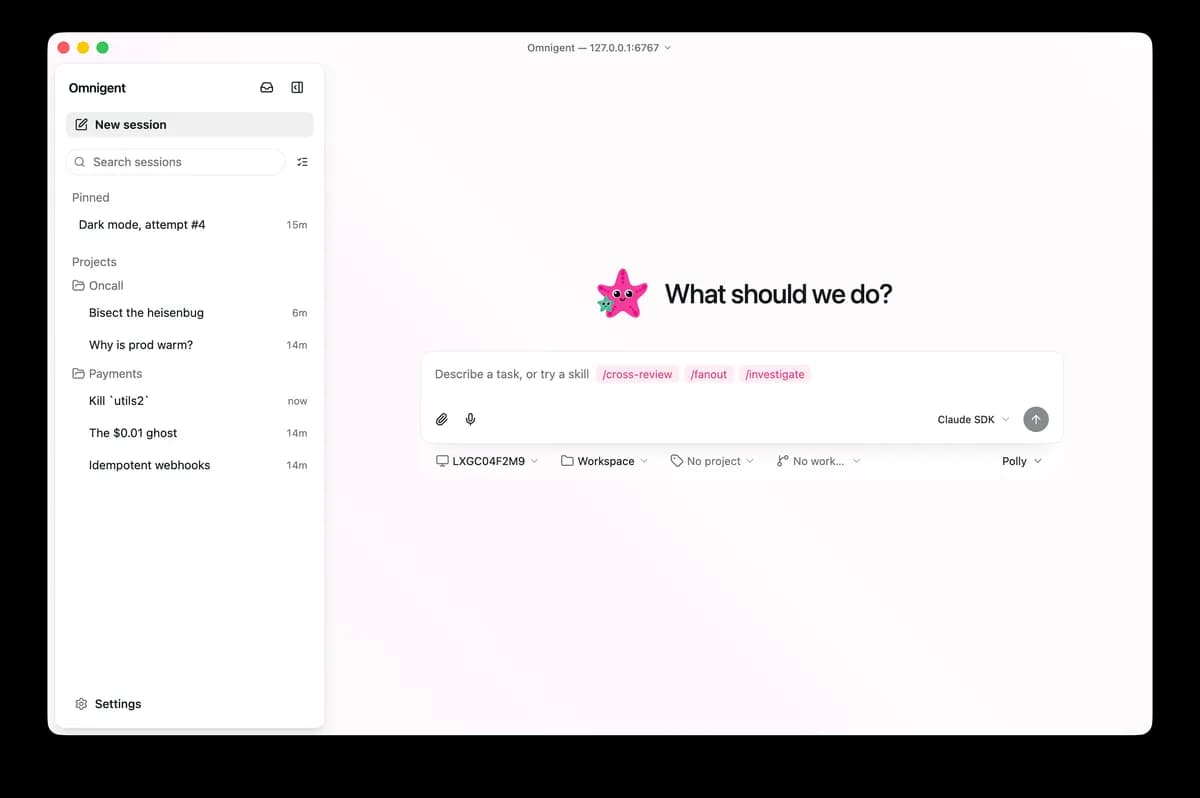
An open-source orchestration layer for running, switching, and collaborating across multiple AI agents through terminal, web, desktop, and cloud-sandbox sessions.
- Backend
- Full stack
- DevOps
- AI coding
- Collaboration
- Security
- CLI
- Web
- Desktop
- Windows
- macOS
- Linux
- Browser
- Self-hostable
- Runs locally
- Docker supported
- Popularity
- 10.4k Stars
- GitHub stars
- Recent activity
- 10/2/2026
- Updated in the last 30 days
- License
- APACHE-2.0
- Permissive
Why it matters
We look beyond stars: what problem it solves, whether it creates real utility, and what makes its approach worth noticing.
Problem
Addresses the fragmentation of AI agent tools, where users struggle to manage workflows consistently across disparate platforms and models.
Practical value
Provides cross-device session synchronization, multi-agent orchestration, and cloud sandbox execution, significantly reducing the maintenance overhead for complex agent tasks.
Innovation / differentiation
Acts as a meta-orchestration layer that unifies various mainstream agent frameworks through a common interface, introducing policy-based governance that differentiates it from standard tools.
Leverage potential
Enables developers to build portable and auditable automation systems by defining agent behaviors via YAML and supporting diverse cloud sandbox providers.
Why now
The AI agent ecosystem is currently transitioning from single-purpose tools to complex systems, making this project timely for addressing the urgent need for multi-agent collaboration and governance.
Community activity
In the last 90 days there were 1553 new issues and 5261 pull requests; the bounded issue/PR samples include 46 issue authors and 41 PR contributors, with 15 releases.
Maintainer responsiveness
The 100-issue window sample had a 82% close rate, and the 100-pull-request sample had a 64% merge rate. Maintainer-comment observations covered only 21% of that issue sample, so response rate and first-response speed are not reported.
Key highlights
- Run Claude Code, Codex, Cursor, and other agents in shared sessions
- Keep session state synchronized across terminal, web, and desktop collaboration surfaces
- Deploy the server with Docker and run sessions in multiple cloud sandbox providers
Quick start
How it is installed, how hard it is, and where to start.
Where it runs
Runs locally
Difficulty
Harder — CLI / server skills help
- 01Use the official installer on Linux/macOS or
uv tool install omnigent; on native Windows, follow the README’s uv installation path. - 02Run
omnigent setupto configure an existing model subscription, API key, or compatible gateway, then validate one local session and its permissions first. - 03Only when team or remote access is needed, enable the server, authentication, Docker/cloud sandboxes, and add approval and budget policies incrementally.
Best for
- Teams that want data on their own servers
- Developers who want to try it on their machine
- People who prefer Docker deploys
More about it
Omnigent puts Claude Code, Codex, Cursor, OpenCode, Hermes, Pi, and custom agents behind a shared session and policy layer. Tasks can start in the terminal and continue in the web or desktop interface, while server deployments and several cloud sandbox providers support remote execution. It also includes team sharing, session forks, approval policies, tool-call limits, and cost caps. Native Windows support is explicitly degraded: the server and SDK-based harnesses work, but the stronger filesystem and network sandboxing available on Linux and macOS is not present.
Sources
Each field shows its status and source — expand to review.
15 · Expand
Sources
Each field shows its status and source — expand to review.
capability tags
Verifiedai_coding, collaboration, security
Source: manual_curated · Manually curated from the verified project README; no in-app AI draft. · 8/17/2026
editor note
Verified{"en":"This is closer to an agent runtime and collaboration layer than a single chat client, making it most relevant to teams already using several agents. Its deployment and permission surface is broad, so start with a local, least-privilege setup before production use.","zh":"更像“Agent 运行与协作底座”而不是单一聊天客户端,适合已经同时使用多个 Agent 的团队。部署和权限面较宽,上生产前应先从单机、小权限策略开始。"}
Source: manual_curated · Manually curated from the verified project README; no in-app AI draft. · 8/17/2026
how to use
Verified{"steps":[{"en":"Use the official installer on Linux/macOS or `uv tool install omnigent`; on native Windows, follow the README’s uv installation path.","zh":"在 Linux/macOS 使用官方安装脚本,或用 `uv tool install omnigent`;Windows 原生环境按 README 使用 uv 安装。"},{"en":"Run `omnigent setup` to configure an existing model subscription, API key, or compatible gateway, then validate one local session and its permissions first.","zh":"运行 `omnigent setup` 配置已有模型订阅、API Key 或兼容网关,然后先启动一个本机会话验证 Agent 与权限。"},{"en":"Only when team or remote access is needed, enable the server, authentication, Docker/cloud sandboxes, and add approval and budget policies incrementally.","zh":"需要团队或远程使用时再启用服务器、认证、Docker/云沙箱,并逐层添加审批和预算策略。"}],"installAt":"local","difficulty":"hard"}
Source: manual_curated · Manually curated from the verified project README; no in-app AI draft. · 8/17/2026
intro
Verified{"en":"Omnigent puts Claude Code, Codex, Cursor, OpenCode, Hermes, Pi, and custom agents behind a shared session and policy layer. Tasks can start in the terminal and continue in the web or desktop interface, while server deployments and several cloud sandbox providers support remote execution. It also includes team sharing, session forks, approval policies, tool-call limits, and cost caps. Native Windows support is explicitly degraded: the server and SDK-based harnesses work, but the stronger filesystem and network sandboxing available on Linux and macOS is not present.","zh":"Omnigent 把 Claude Code、Codex、Cursor、OpenCode、Hermes、Pi 以及自定义 Agent 放到统一会话和策略层中。用户可以从终端启动任务,在 Web 或桌面界面继续查看,也可以把会话放到 Docker 部署的服务或多个云沙箱中运行。它还提供团队共享、会话分叉、审批策略、工具调用次数和成本限制。Windows 原生模式目前功能有明确降级:可运行服务器和 SDK 型 harness,但缺少 Linux/macOS 上完整的文件系统与网络沙箱。"}
Source: manual_curated · Manually curated from the verified project README; no in-app AI draft. · 8/17/2026
Latest release
Verifiedv0.16.0
Source: GitHub API · latest_release=v0.16.0 · 10/2/2026
License
VerifiedApache-2.0
Source: GitHub API · license.spdx_id=Apache-2.0 · 10/2/2026
needs api key
VerifiedNo
Source: manual_curated · Manually curated from the verified project README; no in-app AI draft. · 8/17/2026
One-liner
Verified{"en":"An open-source orchestration layer for running, switching, and collaborating across multiple AI agents through terminal, web, desktop, and cloud-sandbox sessions.","zh":"统一运行、切换和协作多个 AI Agent 的开源编排层,覆盖终端、Web、桌面与云沙箱会话。"}
Source: manual_curated · Manually curated from the verified project README; no in-app AI draft. · 8/17/2026
Platforms
Verifiedwindows, macos, linux, browser
Source: manual_curated · Manually curated from the verified project README; no in-app AI draft. · 8/17/2026
Category hint
Inferred from materialsai-apps
Source: Project README · hint=ai-apps · 8/14/2026
product forms
Verifiedcli, web, desktop
Source: manual_curated · Manually curated from the verified project README; no in-app AI draft. · 8/17/2026
role tags
Verifiedbackend, fullstack, devops
Source: manual_curated · Manually curated from the verified project README; no in-app AI draft. · 8/17/2026
supports docker
VerifiedYes
Source: Repository file · dockerfile=true; compose=true · 10/2/2026
supports local
VerifiedYes
Source: manual_curated · Manually curated from the verified project README; no in-app AI draft. · 8/17/2026
supports self host
VerifiedYes
Source: manual_curated · Manually curated from the verified project README; no in-app AI draft. · 8/17/2026
Related projects
Other verified projects matched by category, capabilities, and intended roles.
ouroboros
Ouroboros is an open-source, general-purpose AI agent with durable cross-restart memory that coordinates specialist swarms and rewrites its own implementation.
sutando
An open-source local AI agent that responds via voice and screen by day, and runs an autonomous build loop by night.
hermes-agent
A personal AI agent that runs locally or on remote infrastructure with terminal, messaging, memory, skills, and scheduled automation.
ollama
A local model runner for Windows, macOS, and Linux with a REST API plus Python and JavaScript clients.
unsloth
A desktop and developer toolkit for running, fine-tuning, and deploying language and diffusion models locally on Windows, macOS, and Linux.
Box
An advanced, fully offline on-device AI suite for Android supporting chat, image generation, and voice features.