RICHQAQProductivity
PasteMD
A desktop clipboard tool that converts Markdown, rich HTML, tables, and formulas for direct pasting into Word, WPS, or Excel.
- Product
- Data
- Productivity
- Content creation
- Desktop
- Windows
- Runs locally
- Popularity
- 5.4k Stars
- GitHub stars
- Recent activity
- 9/2/2026
- Updated in the last 30 days
- License
- AGPL-3.0
- Strong copyleft
Why it matters
We look beyond stars: what problem it solves, whether it creates real utility, and what makes its approach worth noticing.
Problem
Addresses the common pain point of formatting loss, broken tables, and formula corruption when pasting Markdown, rich text, and math formulas from AI chat platforms into Word, WPS, or Excel.
Practical value
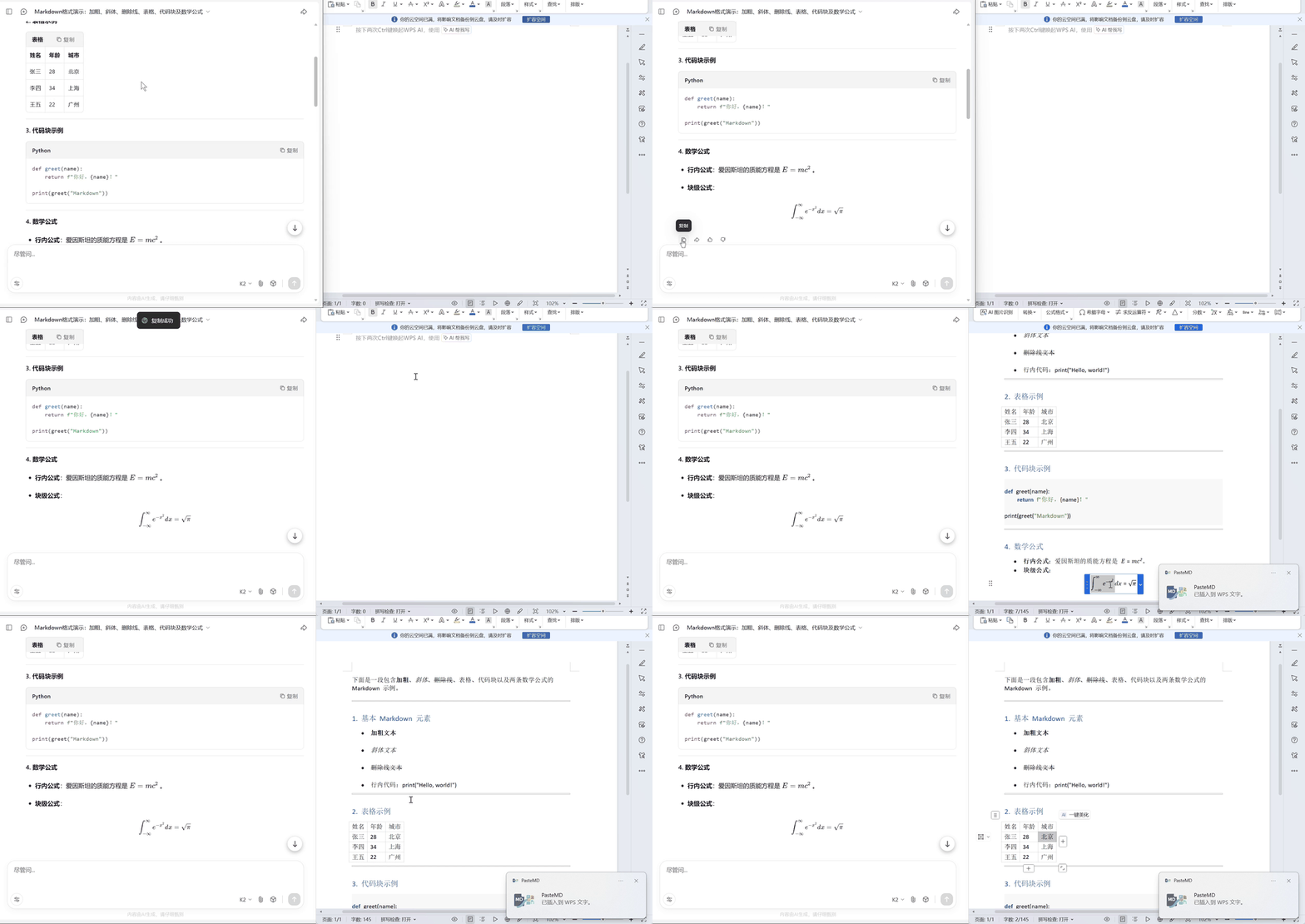
Provides a tray utility with global hotkeys that leverages Pandoc to convert clipboard content and automatically inject it into target office applications at the cursor position.
Innovation / differentiation
Introduces tailored conversion enhancements for office workflows, including application window title matching, automatic LaTeX syntax repair, and intelligent table pasting into Excel.
Leverage potential
Bundles dependencies into an integrated installer package, allowing users to run the application immediately without manual environment configuration.
Why now
Meets the practical demand for transferring LLM-generated output into traditional office documents amidst the high adoption of AI writing tools.
Community activity
In the last 90 days there were 6 new issues and 3 pull requests; the bounded issue/PR samples include 5 issue authors and 3 PR contributors, with 3 releases.
Maintainer responsiveness
The 6-issue window sample had a 17% close rate, and the 3-pull-request sample had a 100% merge rate. Maintainer-comment observations covered only 100% of that issue sample, so response rate and first-response speed are not reported.
Key highlights
- Convert Markdown and rich HTML for insertion into Word or WPS
- Detect Markdown tables and paste them into Excel
- Repair selected LaTeX compatibility issues and single-dollar formula blocks
Quick start
How it is installed, how hard it is, and where to start.
Where it runs
Runs locally
Difficulty
Easy — follow the steps
- 01Download and install the PasteMD package that includes Pandoc from GitHub Releases.
- 02Open Word, WPS, or Excel and place the cursor where the converted content should be inserted.
- 03Copy Markdown or rich web content to the clipboard.
- 04Press the default Ctrl+Shift+B shortcut so PasteMD can detect the target application and perform the conversion.
Best for
- Developers who want to try it on their machine
More about it
PasteMD is a tray application for moving clipboard content into Word, WPS, and Excel while preserving more of the original structure. It targets a common problem when copying AI responses or Markdown documents: tables, formulas, and formatting often do not paste cleanly into office applications. PasteMD reads the clipboard, converts content through Pandoc, and inserts the result at the active document cursor.
Regular Markdown and rich HTML can be converted into DOCX for Word or WPS, while Markdown tables can be detected and pasted into Excel. The project also supports app-specific HTML, Markdown, LaTeX, and file workflows, plus configurable Pandoc filters for different conversion types.
The current release path documented by the project is a Windows installer bundled with Pandoc, with Ctrl+Shift+B as the default global shortcut.
Sources
Each field shows its status and source — expand to review.
14 · Expand
Sources
Each field shows its status and source — expand to review.
capability tags
Verifiedproductivity, content_creation
Source: manual_curated · Manually curated from the verified project README; no AI draft. · 8/17/2026
editor note
Verified{"en":"This is not another Markdown editor; it turns the handoff from AI or Markdown content into Office documents into a system-level shortcut. It is especially practical for users who repeatedly move formulas, tables, and long answers into Word or WPS and would otherwise repair formatting by hand.","zh":"它不是另一个 Markdown 编辑器,而是把“AI/Markdown 内容进入 Office”这一段流程做成了系统级快捷操作。对于经常把公式、表格和长回答整理进 Word/WPS 的用户,这类剪贴板转换比手工修格式更直接。"}
Source: manual_curated · Manually curated from the verified project README; no AI draft. · 8/17/2026
how to use
Verified{"steps":[{"en":"Download and install the PasteMD package that includes Pandoc from GitHub Releases.","zh":"从 GitHub Releases 下载带 Pandoc 的 PasteMD 安装包并完成安装。"},{"en":"Open Word, WPS, or Excel and place the cursor where the converted content should be inserted.","zh":"打开 Word、WPS 或 Excel,把光标放到希望插入内容的位置。"},{"en":"Copy Markdown or rich web content to the clipboard.","zh":"复制 Markdown 或网页内容到剪贴板。"},{"en":"Press the default Ctrl+Shift+B shortcut so PasteMD can detect the target application and perform the conversion.","zh":"按默认热键 Ctrl+Shift+B,让 PasteMD 自动识别目标应用并执行转换粘贴。"}],"installAt":"local","difficulty":"easy"}
Source: manual_curated · Manually curated from the verified project README; no AI draft. · 8/17/2026
intro
Verified{"en":"PasteMD is a tray application for moving clipboard content into Word, WPS, and Excel while preserving more of the original structure. It targets a common problem when copying AI responses or Markdown documents: tables, formulas, and formatting often do not paste cleanly into office applications. PasteMD reads the clipboard, converts content through Pandoc, and inserts the result at the active document cursor.\n\nRegular Markdown and rich HTML can be converted into DOCX for Word or WPS, while Markdown tables can be detected and pasted into Excel. The project also supports app-specific HTML, Markdown, LaTeX, and file workflows, plus configurable Pandoc filters for different conversion types.\n\nThe current release path documented by the project is a Windows installer bundled with Pandoc, with Ctrl+Shift+B as the default global shortcut.","zh":"PasteMD 是一个常驻系统托盘的文档粘贴工具,主要解决从 AI 对话网页或 Markdown 文档复制内容后,表格、公式和排版难以直接进入 Word、WPS 或 Excel 的问题。它读取剪贴板内容,通过 Pandoc 完成格式转换,再把结果插入当前文档光标位置。\n\n对于普通 Markdown 或网页富文本,PasteMD 可以转换为 DOCX 并写入 Word/WPS;检测到 Markdown 表格时,则可以直接粘贴到 Excel。项目还支持 HTML、Markdown、LaTeX 和文件等按应用匹配的粘贴工作流,并允许为不同转换类型配置 Pandoc Filters。\n\n官方当前提供集成 Pandoc 的 Windows 安装包,默认全局热键为 Ctrl+Shift+B。"}
Source: manual_curated · Manually curated from the verified project README; no AI draft. · 8/17/2026
Latest release
Verifiedv0.1.7.4
Source: GitHub API · latest_release=v0.1.7.4 · 10/2/2026
License
VerifiedAGPL-3.0
Source: GitHub API · license.spdx_id=AGPL-3.0 · 10/2/2026
needs api key
VerifiedNo
Source: manual_curated · Manually curated from the verified project README; no AI draft. · 8/17/2026
One-liner
Verified{"en":"A desktop clipboard tool that converts Markdown, rich HTML, tables, and formulas for direct pasting into Word, WPS, or Excel.","zh":"把剪贴板里的 Markdown、网页富文本和公式转换后直接粘贴到 Word、WPS 或 Excel 的桌面工具。"}
Source: manual_curated · Manually curated from the verified project README; no AI draft. · 8/17/2026
Platforms
Verifiedwindows
Source: manual_curated · Manually curated from the verified project README; no AI draft. · 8/17/2026
Category hint
Inferred from materialsai-apps
Source: Project README · hint=ai-apps · 8/14/2026
product forms
Verifieddesktop
Source: manual_curated · Manually curated from the verified project README; no AI draft. · 8/17/2026
role tags
Verifiedproduct, data
Source: manual_curated · Manually curated from the verified project README; no AI draft. · 8/17/2026
supports local
VerifiedYes
Source: manual_curated · Manually curated from the verified project README; no AI draft. · 8/17/2026
supports self host
VerifiedNo
Source: manual_curated · Manually curated from the verified project README; no AI draft. · 8/17/2026
Related projects
Other verified projects matched by category, capabilities, and intended roles.
cal.diy
An open-source scheduling platform for personal self-hosting, with booking pages and calendar management; the project explicitly advises against production use.
macro
A unified workspace integrating email, team chat, CRDT docs, tasks, CRM, and AI agents into a single graph.
Money Manager Ex
A cross-platform personal finance app for accounts, budgets, cash-flow forecasts, and reports, backed by a portable SQLite database.
domain-locker
An open-source domain portfolio manager for tracking expirations, DNS and SSL data, hosting details, costs, changes, and alerts.
excalidraw
An open-source virtual whiteboard for sketching hand-drawn style diagrams with real-time collaboration.
openwiki
A CLI that uses agents to generate and continuously maintain Markdown wikis for codebases or personal knowledge, with a local graph visualizer.