
SarvDeveloper tools
SarvTerminal
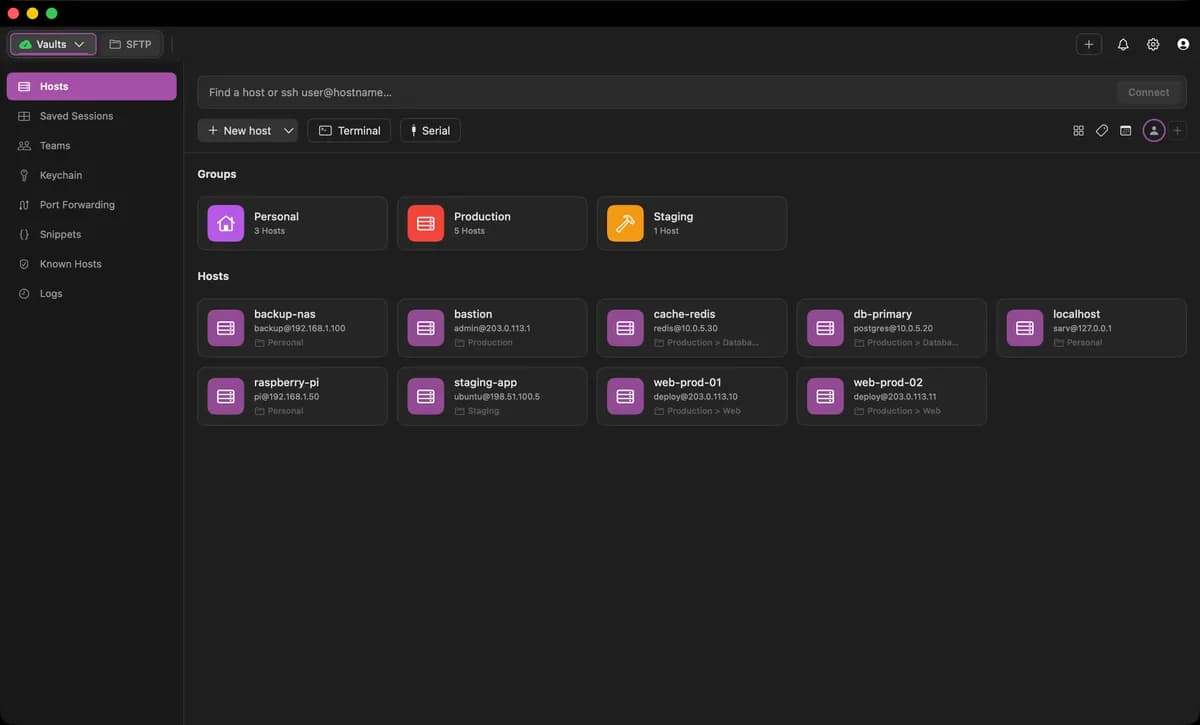
An open-source, GPU-accelerated macOS terminal and SSH connection manager with a host vault, SFTP/SCP, key manager, and end-to-end encrypted sync.
- Backend
- DevOps
- Full stack
- Automation
- Productivity
- Desktop
- macOS
- Runs locally
- Docker supported
- Needs API key
- Popularity
- 64 Stars
- GitHub stars
- Recent activity
- 9/17/2026
- Updated in the last 30 days
- License
- MIT
- Permissive
Why it matters
We look beyond stars: what problem it solves, whether it creates real utility, and what makes its approach worth noticing.
Problem
Integrates a fast terminal engine with graphical SSH connection management, dual-pane file transfer, and quick container access into a single native macOS application, effectively solving fragmented multi-server management.
Practical value
Provides a host vault, SSH key management, port forwarding, SFTP/SCP file transfer, and AI command assistance, offering comprehensive features tailored for daily operations.
Innovation / differentiation
Combines the Ghostty rendering engine with a local-first SSH client and server-to-server direct file transfer mechanism, achieving a strong feature fusion among terminal tools.
Leverage potential
Supports importing existing hosts from iTerm2, PuTTY, and standard SSH configuration files, allowing developers and operators to migrate their workflows quickly.
Why now
Launched amid growing developer demand for local privacy, end-to-end encrypted sync, and AI-assisted tools, aligning well with current terminal market trends.
Community activity
In the last 90 days there were 3 new issues and 4 pull requests; the bounded issue/PR samples include 2 issue authors and 2 PR contributors, with 12 releases.
Maintainer responsiveness
The 3-issue window sample had a 100% close rate, and the 4-pull-request sample had a 75% merge rate. Maintainer-comment observations covered only 100% of that issue sample, so response rate and first-response speed are not reported.
Key highlights
- Saved-host vault with tags, workspaces, per-host color themes, and SSH configuration import
- Dual-pane SFTP and SCP file manager supporting direct server-to-server file transfers
- Graphical port forwarding interface for local, remote, and SOCKS tunnels
Quick start
How it is installed, how hard it is, and where to start.
Where it runs
Runs locally
Difficulty
Easy — follow the steps
- 01Install the signed and notarized macOS application package via Homebrew
- 02Run the installation command in your terminal
Best for
- Developers who want to try it on their machine
- People who prefer Docker deploys
More about it
Sarv Terminal addresses the common workflow split between fast native terminals and commercial SSH connection managers. It merges a GPU-accelerated terminal engine with a comprehensive host vault, putting remote servers, SSH keys, tunnels, and file transfers into a single native macOS workspace.
Designed with a local-first architecture, all hosts, keys, and settings reside locally. Users can optionally back up their configuration via end-to-end AES-256-GCM encryption to a private GitHub repository or a synced folder, with the master password safely retained in the macOS Keychain.
Beyond standard split panes and tabs, it includes one-click Docker and Kubernetes container attachments, a serial console for hardware devices, and AI-assisted error explanations for failed shell commands.
Sources
Each field shows its status and source — expand to review.
15 · Expand
Sources
Each field shows its status and source — expand to review.
capability tags
Verifiedautomation, productivity
Source: admin_cms · cms editor · 8/25/2026
editor note
Verified{"en":"Built on the Ghostty rendering engine, it combines traditional SSH client tooling with a modern native terminal interface. Currently exclusive to macOS.","zh":"该项目基于 Ghostty 渲染引擎构建,把原本分散的 SSH 客户端工具与现代原生终端深度整合在单一界面中。目前仅提供 macOS 客户端。"}
Source: admin_cms · cms editor · 8/25/2026
how to use
Verified{"steps":[{"en":"Install the signed and notarized macOS application package via Homebrew","zh":"通过 Homebrew 安装已签名且经过公证的 macOS 应用程序包"},{"en":"Run the installation command in your terminal","zh":"在终端中运行安装命令"}],"installAt":"local","difficulty":"easy"}
Source: admin_cms · cms editor · 8/25/2026
intro
Verified{"en":"Sarv Terminal addresses the common workflow split between fast native terminals and commercial SSH connection managers. It merges a GPU-accelerated terminal engine with a comprehensive host vault, putting remote servers, SSH keys, tunnels, and file transfers into a single native macOS workspace.\n\nDesigned with a local-first architecture, all hosts, keys, and settings reside locally. Users can optionally back up their configuration via end-to-end AES-256-GCM encryption to a private GitHub repository or a synced folder, with the master password safely retained in the macOS Keychain.\n\nBeyond standard split panes and tabs, it includes one-click Docker and Kubernetes container attachments, a serial console for hardware devices, and AI-assisted error explanations for failed shell commands.","zh":"Sarv Terminal 解决开发人员和运维人员在日常工作中需要在纯终端与商业 SSH 客户端之间切换的痛点。它将 GPU 加速的高性能终端与连接管理器融为一体,让远程服务器、密钥、隧道配置和文件传输集中在同一个原生 macOS 界面中。\n\n应用采用本地优先设计,所有配置和保存的主机信息均存储在本地目录中。用户可以通过主密码配合 AES-256-GCM 算法将配置加密同步至私有 GitHub 仓库或本地同步文件夹,主密码安全保存在 macOS 钥匙串中。\n\n除了常规的终端分屏和标签管理外,它还集成了 Docker 与 Kubernetes 容器一键挂载、串口调试控制台,以及通过接入外部大模型实现的失败命令解析与修复建议。"}
Source: admin_cms · cms editor · 8/25/2026
Latest release
Verifiedv1.10.3
Source: GitHub API · latest_release=v1.10.3 · 10/9/2026
License
VerifiedMIT
Source: GitHub API · license.spdx_id=MIT · 10/9/2026
needs api key
VerifiedYes
Source: admin_cms · cms editor · 8/25/2026
One-liner
Verified{"en":"An open-source, GPU-accelerated macOS terminal and SSH connection manager with a host vault, SFTP/SCP, key manager, and end-to-end encrypted sync.","zh":"面向 macOS 的开源 GPU 加速终端和 SSH 连接管理器,内置连接保险库、SFTP/SCP、密钥管理及端到端加密同步。"}
Source: admin_cms · cms editor · 8/25/2026
Platforms
Verifiedmacos
Source: admin_cms · cms editor · 8/25/2026
Category hint
Inferred from materialsai-apps
Source: Project README · hint=ai-apps · 8/24/2026
product forms
Verifieddesktop
Source: admin_cms · cms editor · 8/25/2026
role tags
Verifiedbackend, devops, fullstack
Source: admin_cms · cms editor · 8/25/2026
supports docker
VerifiedYes
Source: Repository file · dockerfile=true; compose=false · 10/9/2026
supports local
VerifiedYes
Source: admin_cms · cms editor · 8/25/2026
supports self host
VerifiedNo
Source: admin_cms · cms editor · 8/25/2026
Related projects
Other verified projects matched by category, capabilities, and intended roles.
WSL
Windows Subsystem for Linux allows you to run Linux command-line tools and applications directly on Windows without the overhead of a traditional virtual machine.
opencodex
A universal local proxy that enables the use of any LLM, such as Claude, Gemini, or DeepSeek, within Codex and Claude Code, while managing ChatGPT account pools.
cli-printing-press
Automatically generates agent-optimized Go CLI tools and MCP servers by reading API documentation or sniffing web traffic.
agentdock
Secure MCP runtime for AI agents to operate local machines, servers, and containers with multi-device orchestration.
deja-vu
A local memory layer for coding agents that indexes and retrieves past session decisions and code edits.
omni
Reduces AI Agent input token consumption by replacing redundant file reads and command outputs with compact, retrievable handles.