
swiftbarBrowser & desktop
SwiftBar
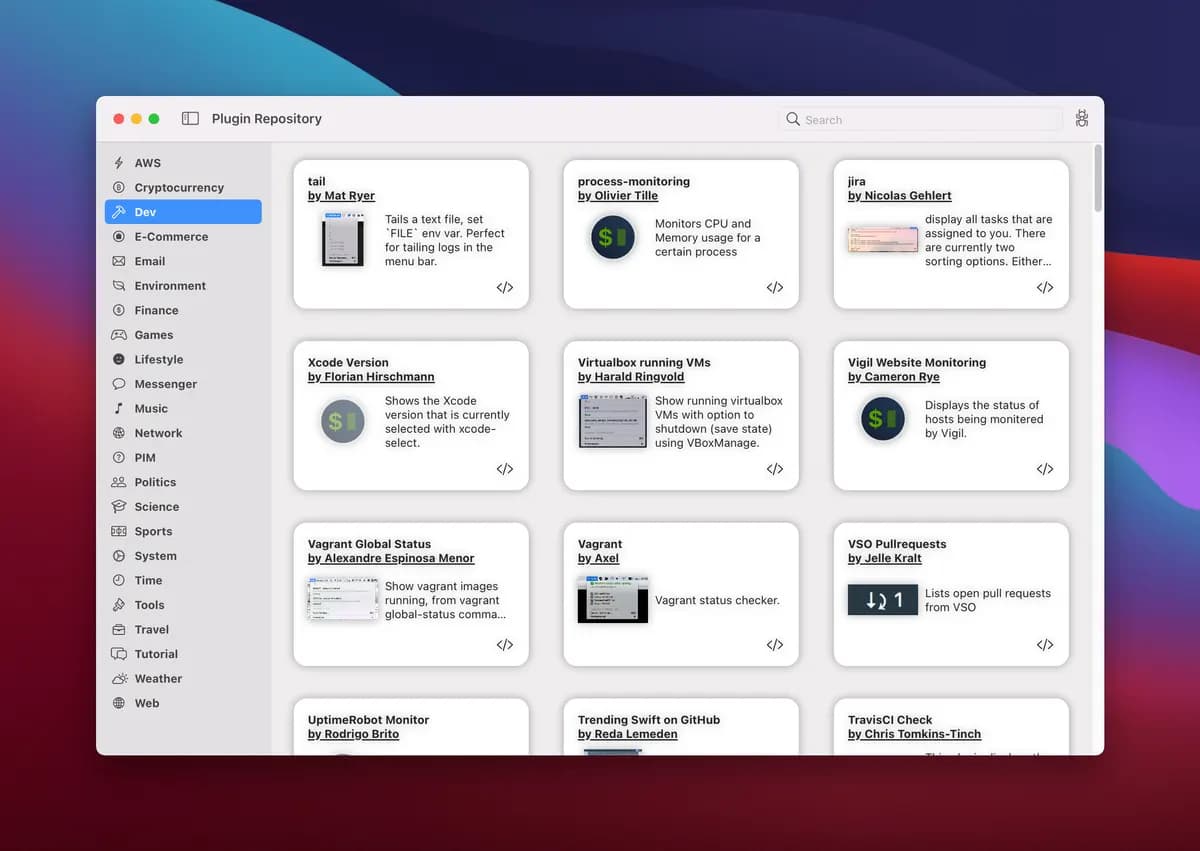
An open-source macOS utility that turns scripts into custom menu bar items and supports the BitBar/xbar plugin format.
- Frontend
- Backend
- DevOps
- Automation
- Productivity
- Desktop
- macOS
- Runs locally
- Popularity
- 4.6k Stars
- GitHub stars
- Recent activity
- 9/29/2026
- Updated in the last 30 days
- License
- MIT
- Permissive
Why it matters
We look beyond stars: what problem it solves, whether it creates real utility, and what makes its approach worth noticing.
Problem
macOS users have limited status bar space and often need custom monitoring data or quick actions not provided natively, addressing the need to integrate script outputs into the system menu bar.
Practical value
Compatible with BitBar and xbar plugin ecosystems, supports script output in various programming languages, and provides refresh rate configuration along with rich text and visual parameter controls.
Innovation / differentiation
Its core concept inherits from existing BitBar and xbar projects, with primary contributions lying in the native macOS implementation and adaptation to newer features.
Leverage potential
Leveraging an existing large plugin repository, users can quickly deploy various system monitoring and productivity tools with high extensibility.
Why now
As a mature macOS status bar script host tool, updates primarily progress alongside macOS system version iterations.
Community activity
In the last 90 days there were 40 new issues and 41 pull requests; the bounded issue/PR samples include 23 issue authors and 7 PR contributors, with at least 7 releases.
Maintainer responsiveness
The 40-issue window sample had a 85% close rate, and the 41-pull-request sample had a 95% merge rate. Maintainer-response observations covered 100% of that issue sample, with a 45% response rate and median first response of 17.1 hours.
Key highlights
- Render executable script output as macOS menu bar items and dropdown menus
- Include a plugin repository and remain compatible with the BitBar/xbar plugin API
- Set refresh intervals from milliseconds to days through plugin filenames
Quick start
How it is installed, how hard it is, and where to start.
Where it runs
Runs locally
Difficulty
Easy — follow the steps
- 01On macOS 12 or newer, download SwiftBar from GitHub Releases or run
brew install swiftbar. - 02Choose a Plugin Folder on first launch.
- 03Place an executable script using the documented filename format in that folder, or install an existing plugin from Get Plugins.
Best for
- Developers who want to try it on their machine
More about it
SwiftBar turns the output of executable scripts into items and menus in the macOS menu bar. Users can write their own scripts in shell or another executable language or install existing plugins from the built-in plugin repository, and plugin filenames can define refresh intervals. The project is compatible with the BitBar/xbar plugin API and supports output parameters for styling, icons, and interactions, making it a lightweight way to expose system status, development information, or frequent actions from the menu bar.
Sources
Each field shows its status and source — expand to review.
11 · Expand
Sources
Each field shows its status and source — expand to review.
capability tags
Verifiedautomation, productivity
Source: manual_curator · README manually reviewed for release curation · 8/17/2026
Latest release
Verifiedv2.1.1
Source: GitHub API · latest_release=v2.1.1 · 10/1/2026
License
VerifiedMIT
Source: GitHub API · license.spdx_id=MIT · 10/1/2026
needs api key
VerifiedNo
Source: manual_curator · README manually reviewed for release curation · 8/17/2026
One-liner
Verified{"en":"An open-source macOS utility that turns scripts into custom menu bar items and supports the BitBar/xbar plugin format.","zh":"通过脚本把自定义信息和操作放进 macOS 菜单栏的开源桌面工具,兼容 BitBar/xbar 插件格式。"}
Source: manual_curator · README manually reviewed for release curation · 8/17/2026
Platforms
Verifiedmacos
Source: manual_curator · README manually reviewed for release curation · 8/17/2026
Category hint
Inferred from materialssecurity
Source: Project README · hint=security · 8/17/2026
product forms
Verifieddesktop
Source: manual_curator · README manually reviewed for release curation · 8/17/2026
role tags
Verifiedfrontend, backend, devops
Source: manual_curator · README manually reviewed for release curation · 8/17/2026
supports local
VerifiedYes
Source: manual_curator · README manually reviewed for release curation · 8/17/2026
supports self host
VerifiedNo
Source: manual_curator · README manually reviewed for release curation · 8/17/2026
Related projects
Other verified projects matched by category, capabilities, and intended roles.
peerd
A browser-native AI agent runtime that drives tabs, executes sandboxed compute, and manages tasks directly within your browser via an extension.
PowerToys
A Microsoft-maintained set of Windows utilities for window layouts, keyboard shortcuts, file tasks, and everyday system workflows.
Linguist
An open-source browser translation extension for pages, selections, inputs, and subtitles, with on-device offline translation and custom backends.
Flare
A graph-first IDE for agentic coding featuring a live codebase map, integrated terminal, and MCP task collaboration.
massing
Open-source, self-hosted, IFC-native AEC platform featuring in-browser BIM modeling, a general contractor portal, and development proforma tools.
ragflow
An open-source RAG engine fusing deep document understanding and agent capabilities to build grounded context layers for LLMs.