
- 社区热度
- 10.4k Stars
- GitHub 收藏
- 最近活跃
- 2026/9/30
- 近 30 天还在更新
- 授权协议
- APACHE-2.0
- 宽松协议
为什么值得关注
不是看 Star 排名,而是看它解决了什么问题、实际有没有用,以及方法为什么值得关注。
解决的问题
解决了当前 AI 代理工具碎片化的问题,用户难以在不同平台和模型间统一管理工作流。
实际价值
提供了跨终端的会话同步、多代理协同以及云端沙箱运行能力,减少了复杂代理任务的维护成本。
创新 / 差异化
作为元编排层,通过统一接口兼容了多种主流代理框架,并引入了基于策略的治理机制,在同类工具中具有差异化优势。
扩展潜力
通过 YAML 定义代理行为并支持多种云沙箱,便于开发者构建可移植、可审计的自动化系统。
为什么是现在
当前 AI 代理生态正处于从单点工具向复杂系统演进的阶段,该项目切中了多代理协作与治理的迫切需求。
社区活跃度
近 90 天新增 1555 个 Issue、5208 个 PR;窗口内抽取的 Issue/PR 样本中有 44 位 Issue 发起者、37 位 PR 贡献者,并发布 16 个版本。
维护者响应
窗口内 97 个 Issue 样本关闭率 79%,84 个 PR 样本合并率 70%。维护者评论样本仅覆盖该 Issue 样本的 18%,不足以可靠判断首次响应率与响应速度。
核心亮点
- 在统一会话中运行 Claude Code、Codex、Cursor 等多个 Agent
- 终端、Web 和桌面界面共享会话状态并支持团队协作
- 支持 Docker 服务部署和多种云沙箱执行环境
快速开始
安装方式、上手难度、开始步骤。
装在哪
本地运行
难不难
较难,需要懂命令行/服务器
- 01在 Linux/macOS 使用官方安装脚本,或用
uv tool install omnigent;Windows 原生环境按 README 使用 uv 安装。 - 02运行
omnigent setup配置已有模型订阅、API Key 或兼容网关,然后先启动一个本机会话验证 Agent 与权限。 - 03需要团队或远程使用时再启用服务器、认证、Docker/云沙箱,并逐层添加审批和预算策略。
更适合谁
- 希望数据放在自己服务器上的团队
- 想在本机直接跑起来试用的开发者
- 习惯用 Docker 部署的人
更多介绍
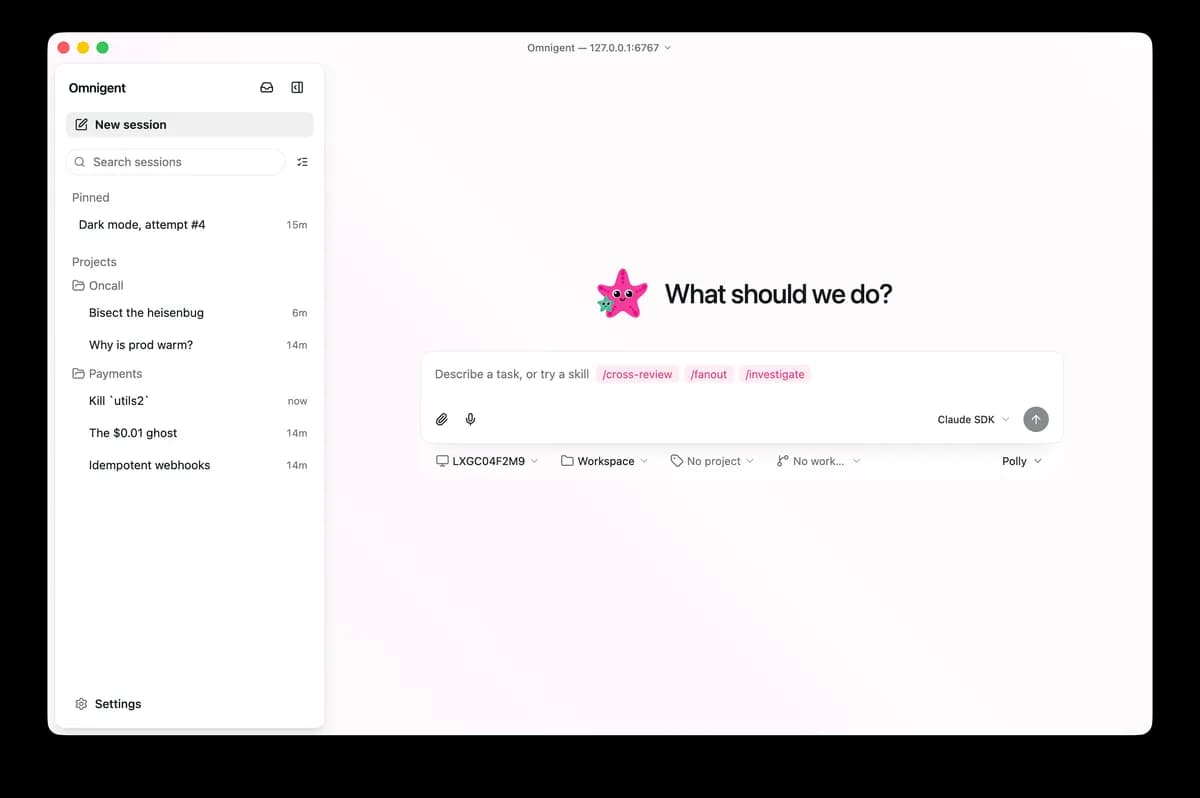
Omnigent 把 Claude Code、Codex、Cursor、OpenCode、Hermes、Pi 以及自定义 Agent 放到统一会话和策略层中。用户可以从终端启动任务,在 Web 或桌面界面继续查看,也可以把会话放到 Docker 部署的服务或多个云沙箱中运行。它还提供团队共享、会话分叉、审批策略、工具调用次数和成本限制。Windows 原生模式目前功能有明确降级:可运行服务器和 SDK 型 harness,但缺少 Linux/macOS 上完整的文件系统与网络沙箱。
信息来源
每条信息都标注了状态与出处,可展开查看。
15 条 · 展开
信息来源
每条信息都标注了状态与出处,可展开查看。
capability tags
已核验ai_coding、collaboration、security
来源: manual_curated · Manually curated from the verified project README; no in-app AI draft. · 2026/8/17
editor note
已核验{"en":"This is closer to an agent runtime and collaboration layer than a single chat client, making it most relevant to teams already using several agents. Its deployment and permission surface is broad, so start with a local, least-privilege setup before production use.","zh":"更像“Agent 运行与协作底座”而不是单一聊天客户端,适合已经同时使用多个 Agent 的团队。部署和权限面较宽,上生产前应先从单机、小权限策略开始。"}
来源: manual_curated · Manually curated from the verified project README; no in-app AI draft. · 2026/8/17
how to use
已核验{"steps":[{"en":"Use the official installer on Linux/macOS or `uv tool install omnigent`; on native Windows, follow the README’s uv installation path.","zh":"在 Linux/macOS 使用官方安装脚本,或用 `uv tool install omnigent`;Windows 原生环境按 README 使用 uv 安装。"},{"en":"Run `omnigent setup` to configure an existing model subscription, API key, or compatible gateway, then validate one local session and its permissions first.","zh":"运行 `omnigent setup` 配置已有模型订阅、API Key 或兼容网关,然后先启动一个本机会话验证 Agent 与权限。"},{"en":"Only when team or remote access is needed, enable the server, authentication, Docker/cloud sandboxes, and add approval and budget policies incrementally.","zh":"需要团队或远程使用时再启用服务器、认证、Docker/云沙箱,并逐层添加审批和预算策略。"}],"installAt":"local","difficulty":"hard"}
来源: manual_curated · Manually curated from the verified project README; no in-app AI draft. · 2026/8/17
intro
已核验{"en":"Omnigent puts Claude Code, Codex, Cursor, OpenCode, Hermes, Pi, and custom agents behind a shared session and policy layer. Tasks can start in the terminal and continue in the web or desktop interface, while server deployments and several cloud sandbox providers support remote execution. It also includes team sharing, session forks, approval policies, tool-call limits, and cost caps. Native Windows support is explicitly degraded: the server and SDK-based harnesses work, but the stronger filesystem and network sandboxing available on Linux and macOS is not present.","zh":"Omnigent 把 Claude Code、Codex、Cursor、OpenCode、Hermes、Pi 以及自定义 Agent 放到统一会话和策略层中。用户可以从终端启动任务,在 Web 或桌面界面继续查看,也可以把会话放到 Docker 部署的服务或多个云沙箱中运行。它还提供团队共享、会话分叉、审批策略、工具调用次数和成本限制。Windows 原生模式目前功能有明确降级:可运行服务器和 SDK 型 harness,但缺少 Linux/macOS 上完整的文件系统与网络沙箱。"}
来源: manual_curated · Manually curated from the verified project README; no in-app AI draft. · 2026/8/17
最新版本
已核验v0.16.0
来源: GitHub 官方接口 · latest_release=v0.16.0 · 2026/9/30
许可证
已核验Apache-2.0
来源: GitHub 官方接口 · license.spdx_id=Apache-2.0 · 2026/9/30
needs api key
已核验否
来源: manual_curated · Manually curated from the verified project README; no in-app AI draft. · 2026/8/17
一句话用途
已核验{"en":"An open-source orchestration layer for running, switching, and collaborating across multiple AI agents through terminal, web, desktop, and cloud-sandbox sessions.","zh":"统一运行、切换和协作多个 AI Agent 的开源编排层,覆盖终端、Web、桌面与云沙箱会话。"}
来源: manual_curated · Manually curated from the verified project README; no in-app AI draft. · 2026/8/17
平台
已核验windows、macos、linux、browser
来源: manual_curated · Manually curated from the verified project README; no in-app AI draft. · 2026/8/17
分类线索
根据材料推断ai-apps
来源: 项目说明文档 · hint=ai-apps · 2026/8/14
product forms
已核验cli、web、desktop
来源: manual_curated · Manually curated from the verified project README; no in-app AI draft. · 2026/8/17
role tags
已核验backend、fullstack、devops
来源: manual_curated · Manually curated from the verified project README; no in-app AI draft. · 2026/8/17
supports docker
已核验是
来源: 仓库文件 · dockerfile=true; compose=true · 2026/9/30
supports local
已核验是
来源: manual_curated · Manually curated from the verified project README; no in-app AI draft. · 2026/8/17
supports self host
已核验是
来源: manual_curated · Manually curated from the verified project README; no in-app AI draft. · 2026/8/17
相关项目
根据分类、能力和适用角色匹配的其他已核验项目。
ouroboros
Ouroboros 是一个开源、通用的自建构 AI 代理,具备跨任务和重启的持久记忆,能够自主协调专业代理集群并重写自身代码与架构。
sutando
一个在白天通过语音和屏幕交互响应任务、在夜间自主运行构建循环与自举演进的开源本地 AI 智能体。
hermes-agent
可在本机、VPS 或云环境运行的个人 AI Agent,支持终端、消息平台、记忆、技能和定时自动化。
ollama
在 Windows、macOS 和 Linux 本地运行与管理开放模型,并提供 REST API 与 Python/JavaScript 客户端的模型运行工具。
unsloth
在 Windows、macOS 和 Linux 本地运行、微调与部署大语言模型及扩散模型的桌面与开发工具。
Box
一个面向 Android 设备的离线端侧 AI 套件,支持大模型聊天、图像生成和语音交互。