
activeing123Developer tools
mcptoon
A lightweight MCP CLI client that reduces AI agent context usage by compressing tool manifests and execution results.
- Backend
- DevOps
- Full stack
- Automation
- Security
- CLI
- Windows
- macOS
- Linux
- Self-hostable
- Runs locally
- Docker supported
- Popularity
- 218 Stars
- GitHub stars
- Recent activity
- 10/9/2026
- Updated in the last 30 days
- License
- APACHE-2.0
- Permissive
Why it matters
We look beyond stars: what problem it solves, whether it creates real utility, and what makes its approach worth noticing.
Problem
AI agents using Model Context Protocol (MCP) load all tool JSON schemas directly into the context window, causing 10 servers to consume tens of thousands of tokens and hundreds to deplete the window, alongside tedious configuration.
Practical value
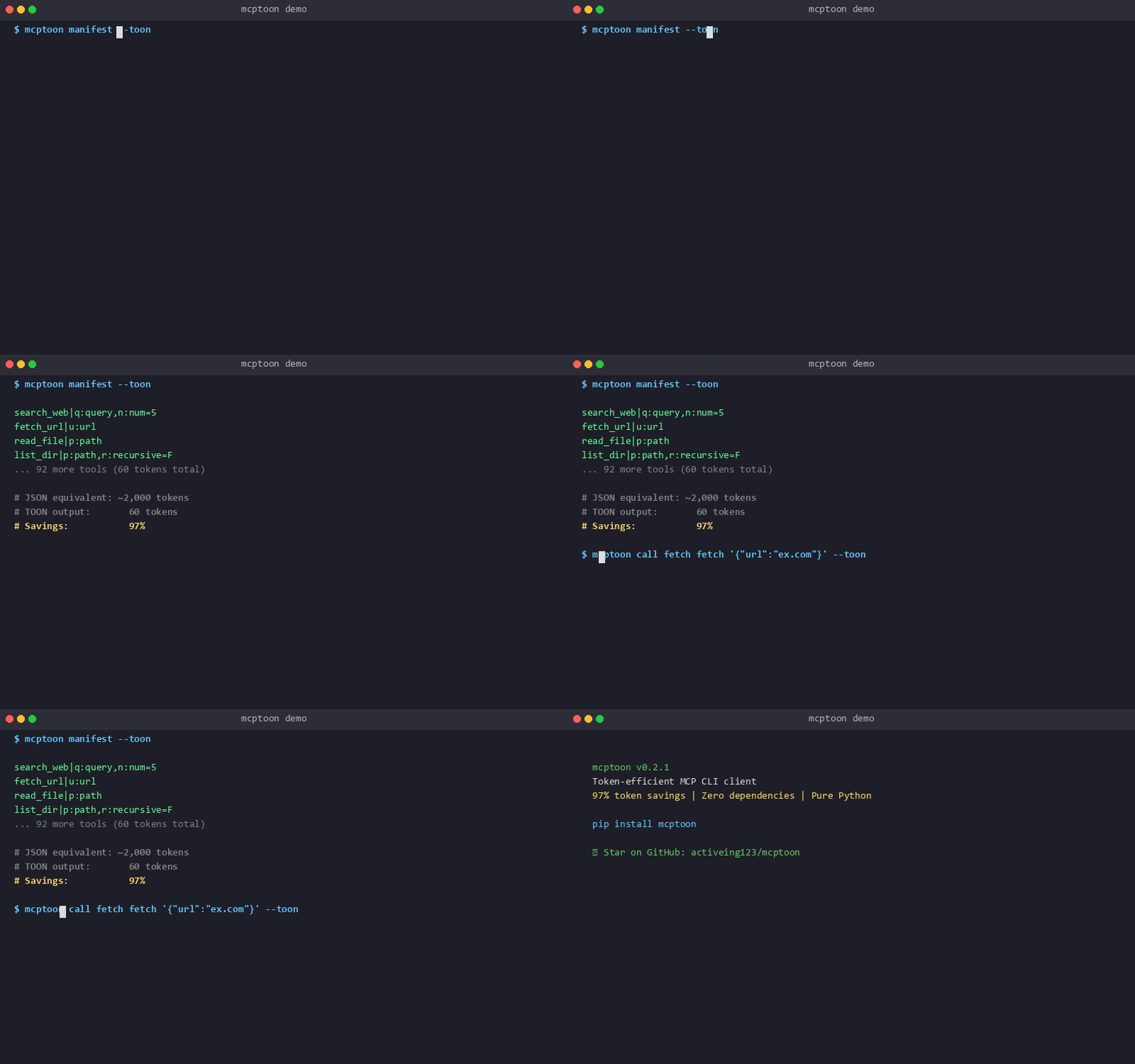
Acts as a zero-dependency Python CLI intermediary (~200KB), reducing discovery overhead for 255 tools from 90,804 tokens to 117 tokens, shrinking result payloads by 30-60%, and adding built-in security guards.
Innovation / differentiation
Shifts away from traditional direct client connection by letting agents query and execute via shell commands, keeping tool descriptions out of context and introducing custom TOON encoding and compression formats.
Leverage potential
Compatible with any agent capable of running shell commands like Claude Code, Cursor, and Codex, utilizing a shared single configuration file where server modifications apply globally across all agents.
Why now
Arrives as the MCP ecosystem expands and developers frequently encounter context exhaustion and configuration friction due to proliferating tools, offering high temporal value for optimizing LLM inference costs.
Community activity
In the last 90 days there were 16 new issues and 3 pull requests; the bounded issue/PR samples include 4 issue authors and 3 PR contributors, with at least 50 releases.
Maintainer responsiveness
The 16-issue window sample had a 100% close rate, and the 3-pull-request sample had a 33% merge rate. Maintainer-response observations covered 100% of that issue sample, with a 63% response rate and median first response of 20 hours.
Key highlights
- Intercepts and compacts MCP tool discovery and execution via CLI to reduce schema context consumption by over 97%
- Adds or installs arbitrary MCP servers from npm, pip, and HTTP/SSE with single-command setup
- Includes built-in three-layer security protection for dangerous operations, prompt injections, and credential leaks
Quick start
How it is installed, how hard it is, and where to start.
Where it runs
Runs locally
Difficulty
Easy — follow the steps
- 01Install the mcptoon tool using pip.
- 02Add an MCP server using the add command, for example, to add the fetch tool.
- 03Use the manifest command to view the list of configured tools.
- 04Invoke a tool using the call command to receive a compressed response.
Best for
- Teams that want data on their own servers
- Developers who want to try it on their machine
- People who prefer Docker deploys
More about it
mcptoon is an MCP (Model Context Protocol) CLI client designed for AI agents. It avoids the traditional approach of loading all tool schemas into the context window, instead keeping configurations on disk and passing only compact results during execution to significantly reduce token usage.
It requires no complex setup and allows for managing and invoking various MCP servers via single commands. Compatible with any AI agent capable of running shell commands—such as Claude Code, Cursor, or custom scripts—it ensures your context window remains efficient even when managing hundreds of tools.
Sources
Each field shows its status and source — expand to review.
15 · Expand
Sources
Each field shows its status and source — expand to review.
capability tags
Verifiedautomation, security
Source: admin_cms · cms editor · 8/21/2026
editor note
Verified{"en":"By offloading MCP server schemas from the AI context and returning only compact data upon execution, this tool is ideal for managing complex AI automation with many tools. Its zero-dependency design ensures stable operation across various shell environments.","zh":"该工具通过将 MCP 服务器的架构定义从 AI 上下文中剥离,仅在调用时返回精简数据,非常适合管理大量工具的复杂 AI 自动化任务。由于其零依赖特性,它在各种 shell 环境中均可稳定运行。"}
Source: admin_cms · cms editor · 8/21/2026
how to use
Verified{"steps":[{"en":"Install the mcptoon tool using pip.","zh":"使用 pip 安装 mcptoon 工具。"},{"en":"Add an MCP server using the add command, for example, to add the fetch tool.","zh":"通过 add 命令添加 MCP 服务器,例如添加 fetch 工具。"},{"en":"Use the manifest command to view the list of configured tools.","zh":"使用 manifest 命令查看已配置的工具列表。"},{"en":"Invoke a tool using the call command to receive a compressed response.","zh":"通过 call 命令调用工具并获取压缩后的响应。"}],"installAt":"local","difficulty":"easy"}
Source: admin_cms · cms editor · 8/21/2026
intro
Verified{"en":"mcptoon is an MCP (Model Context Protocol) CLI client designed for AI agents. It avoids the traditional approach of loading all tool schemas into the context window, instead keeping configurations on disk and passing only compact results during execution to significantly reduce token usage.\n\nIt requires no complex setup and allows for managing and invoking various MCP servers via single commands. Compatible with any AI agent capable of running shell commands—such as Claude Code, Cursor, or custom scripts—it ensures your context window remains efficient even when managing hundreds of tools.","zh":"mcptoon 是一个专为 AI 代理设计的 MCP(Model Context Protocol)命令行客户端。它改变了传统 MCP 客户端将所有工具架构加载到上下文中的做法,将配置保留在本地磁盘,仅在执行时通过精简格式传递结果,从而大幅降低 Token 消耗。\n\n该工具无需复杂的配置,支持通过单条命令管理和调用各类 MCP 服务器。它适用于任何支持执行 Shell 命令的 AI 代理,如 Claude Code、Cursor 或自定义脚本,确保在管理数百个工具时依然保持上下文窗口的清爽。"}
Source: admin_cms · cms editor · 8/21/2026
Latest release
Verifiedv0.8.16
Source: GitHub API · latest_release=v0.8.16 · 10/10/2026
License
VerifiedApache-2.0
Source: GitHub API · license.spdx_id=Apache-2.0 · 10/10/2026
needs api key
VerifiedNo
Source: admin_cms · cms editor · 8/21/2026
One-liner
Verified{"en":"A lightweight MCP CLI client that reduces AI agent context usage by compressing tool manifests and execution results.","zh":"一个轻量级 MCP 命令行客户端,通过压缩工具清单和响应数据,显著减少 AI 代理的上下文占用。"}
Source: admin_cms · cms editor · 8/21/2026
Platforms
Verifiedwindows, macos, linux
Source: admin_cms · cms editor · 8/21/2026
Category hint
Inferred from materialsai-apps
Source: Project README · hint=ai-apps · 8/17/2026
product forms
Verifiedcli
Source: admin_cms · cms editor · 8/21/2026
role tags
Verifiedbackend, devops, fullstack
Source: admin_cms · cms editor · 8/21/2026
supports docker
VerifiedYes
Source: Repository file · dockerfile=true; compose=false · 10/10/2026
supports local
VerifiedYes
Source: admin_cms · cms editor · 8/21/2026
supports self host
VerifiedYes
Source: admin_cms · cms editor · 8/21/2026
Related projects
Other verified projects matched by category, capabilities, and intended roles.
microsandbox
A fast, local-first microVM runtime and library for running untrusted workloads.
open-connector
An open-source agent connector gateway that keeps third-party app accounts behind a dedicated runtime and exposes actions through web, MCP, HTTP/OpenAPI, and SDK interfaces.
nono
A zero-latency, zero-setup sandbox for AI agents that enforces least-privilege isolation for both the agent and its delegated tools.
compose
Docker’s official CLI tool for defining and running multi-container applications from a Compose file.
WSL
Windows Subsystem for Linux allows you to run Linux command-line tools and applications directly on Windows without the overhead of a traditional virtual machine.
opencodex
A universal local proxy that enables the use of any LLM, such as Claude, Gemini, or DeepSeek, within Codex and Claude Code, while managing ChatGPT account pools.