
hcavarsanOps & cloud
kftray
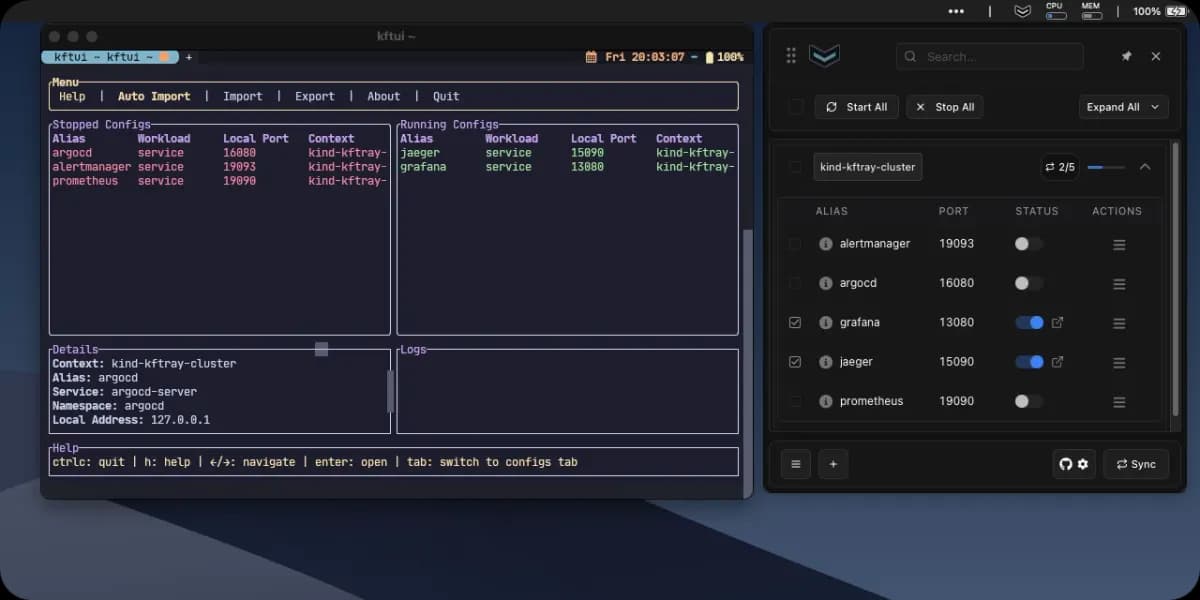
A desktop and TUI Kubernetes port-forward manager with automatic reconnection, multi-forward control, and TCP/UDP support.
- DevOps
- Backend
- Automation
- API debugging
- Monitoring / Observability
- Desktop
- CLI
- macOS
- Linux
- Runs locally
- Docker supported
- Popularity
- 1.6k Stars
- GitHub stars
- Recent activity
- 10/3/2026
- Updated in the last 30 days
- License
- GPL-3.0
- Strong copyleft
Why it matters
We look beyond stars: what problem it solves, whether it creates real utility, and what makes its approach worth noticing.
Problem
Native kubectl port forwarding drops connections on pod restarts or network interruptions without automatic recovery or multi-port management, forcing manual intervention.
Practical value
Provides desktop and TUI clients with automatic reconnection on pod changes, TCP/UDP support, HTTP logging, and centralized configuration management.
Innovation / differentiation
Combines the Kubernetes watch API for lifecycle-aware auto-reconnection with cluster proxy relays for UDP forwarding and reverse tunneling.
Leverage potential
Consolidates dozens of port forwarding rules into a single interface or terminal, reducing multi-window overhead for daily cluster debugging.
Why now
Addresses persistent local debugging pain points in cloud-native development with mature graphical and terminal alternatives.
Community activity
In the last 90 days there were 2 new issues and 38 pull requests; the bounded issue/PR samples include 2 issue authors and 6 PR contributors, with at least 7 releases.
Maintainer responsiveness
The 2-issue window sample had a 100% close rate, and the 38-pull-request sample had a 63% merge rate. Maintainer-comment observations covered only 0% of that issue sample, so response rate and first-response speed are not reported.
Key highlights
- Reconnects forwards after pod replacement, rescheduling, or network recovery
- Desktop kftray and terminal kftui share a Rust backend and configuration
- Manages multiple forwards with TCP and UDP support through an in-cluster relay
Quick start
How it is installed, how hard it is, and where to start.
Where it runs
Runs locally
Difficulty
Medium — some setup needed
- 01Install the desktop app from the kftray download page, or install kftui via the documented Homebrew, Cargo, or release path.
- 02Select the kubeconfig/context and create one test forward to verify the target Service/Pod and local port.
- 03Add GitHub/annotation-based configuration only when sharing is useful; enable HTTP logs only for debugging and avoid sensitive payloads.
Best for
- Developers who want to try it on their machine
- People who prefer Docker deploys
More about it
kftray targets the operational gaps that appear when kubectl port-forward is used for more than a quick check: pod replacement breaks connections, multiple forwards become scattered across terminals, and UDP or inspection workflows need extra plumbing. The kftray desktop app and kftui terminal UI share a Rust backend and configuration format. They watch Kubernetes pod lifecycle events and can reconnect after pod changes, sleep, or network interruptions. Multiple forwards can be managed together, while an in-cluster relay adds TCP/UDP scenarios and configurations can be imported from GitHub or Kubernetes annotations. Optional HTTP request/response logging helps debugging, but the README explicitly warns that those logs may expose sensitive data and should be enabled selectively and sanitized.
Sources
Each field shows its status and source — expand to review.
12 · Expand
Sources
Each field shows its status and source — expand to review.
capability tags
Verifiedautomation, api_debugging, monitoring
Source: admin_cms · cms editor · 8/17/2026
Latest release
Verifiedv0.29.2
Source: GitHub API · latest_release=v0.29.2 · 10/3/2026
License
VerifiedGPL-3.0
Source: GitHub API · license.spdx_id=GPL-3.0 · 10/3/2026
needs api key
VerifiedNo
Source: admin_cms · cms editor · 8/17/2026
One-liner
Verified{"en":"A desktop and TUI Kubernetes port-forward manager with automatic reconnection, multi-forward control, and TCP/UDP support.","zh":"面向 Kubernetes 的桌面端/TUI 端口转发工具,可在 Pod 变化或网络恢复后自动重连,并集中管理多条 TCP/UDP 转发。"}
Source: admin_cms · cms editor · 8/17/2026
Platforms
Verifiedmacos, linux
Source: admin_cms · cms editor · 8/17/2026
Category hint
Inferred from materialssecurity
Source: Project README · hint=security · 8/17/2026
product forms
Verifieddesktop, cli
Source: admin_cms · cms editor · 8/17/2026
role tags
Verifieddevops, backend
Source: admin_cms · cms editor · 8/17/2026
supports docker
VerifiedYes
Source: Repository file · dockerfile=true; compose=false · 10/3/2026
supports local
VerifiedYes
Source: admin_cms · cms editor · 8/17/2026
supports self host
VerifiedNo
Source: admin_cms · cms editor · 8/17/2026
Related projects
Other verified projects matched by category, capabilities, and intended roles.
terraform
Terraform is an infrastructure-as-code tool that manages the lifecycle of cloud and local resources using declarative configuration files.
Flawless
An enterprise Agentic SRE platform for Kubernetes and cloud infrastructure that automates fault discovery, evidence gathering, diagnosis, controlled execution, and recovery verification.
prometheus
A monitoring system that scrapes target metrics, queries them with PromQL, evaluates rules, and triggers alerts when configured conditions are met.
databasus
A self-hosted database backup manager with scheduling, restore verification, multiple storage targets, retention policies, and notifications.
oneuptime
An open-source observability platform combining uptime monitoring, on-call alerting, incident response, status pages, logs, metrics, and traces.
Pulse
A self-hosted infrastructure monitoring workspace for Proxmox, Docker, Kubernetes, TrueNAS, and physical or virtual machines with history and alerts.