
- 社区热度
- 6.1k Stars
- GitHub 收藏
- 最近活跃
- 2026/10/1
- 近 30 天还在更新
- 授权协议
- MIT
- 宽松协议
为什么值得关注
不是看 Star 排名,而是看它解决了什么问题、实际有没有用,以及方法为什么值得关注。
解决的问题
传统桌面办公软件高度依赖人工手动操作,缺乏能直接穿透本地文件、终端、浏览器和办公文档的综合执行层。
实际价值
通过集成多 Agent、28 项内置技能、MCP 扩展、定时任务与主流 IM 远程控制,能够真实处理长流程、跨应用的日常办公与自动化任务。
创新 / 差异化
采用桌面 Cowork 界面与 OpenClaw 运行时分离的架构,在本地保持状态持久化、权限管控与审批机制的同时,解耦了底层的 Agent 执行逻辑。
扩展潜力
支持 Windows 与 macOS 桌面端运行,并能通过微信、企业微信、钉钉、飞书等 IM 渠道进行远程控制,扩展了本地 Agent 的触达边界。
为什么是现在
桌面级 AI Agent 正从单一聊天助手转向具备系统操作能力的实用工具,此时开源、多模态、可控权限的本地方案契合当前需求。
社区活跃度
近 90 天新增 34 个 Issue、493 个 PR;窗口内抽取的 Issue/PR 样本中有 23 位 Issue 发起者、6 位 PR 贡献者,并发布 至少 24 个版本。
维护者响应
窗口内 34 个 Issue 样本关闭率 21%,89 个 PR 样本合并率 98%。维护者评论样本仅覆盖该 Issue 样本的 24%,不足以可靠判断首次响应率与响应速度。
核心亮点
- 操作本地文件、终端、浏览器、文档、表格和演示文稿
- 创建具有独立模型、技能、工作目录与 IM 绑定的多个 Agent
- 内置 28 个技能,并支持外部 MCP Server
快速开始
安装方式、上手难度、开始步骤。
装在哪
本地运行
难不难
容易,照着走就行
- 01从 LobsterAI 官网或 GitHub Releases 下载 macOS 或 Windows 安装包。
- 02启动应用并配置需要使用的模型与主 Agent。
- 03根据任务启用内置 Skills、Expert Kits 或添加 MCP Server。
- 04在 Cowork 会话中给出文件、浏览器或办公任务,并在敏感操作出现时确认权限。
更适合谁
- 想在本机直接跑起来试用的开发者
更多介绍
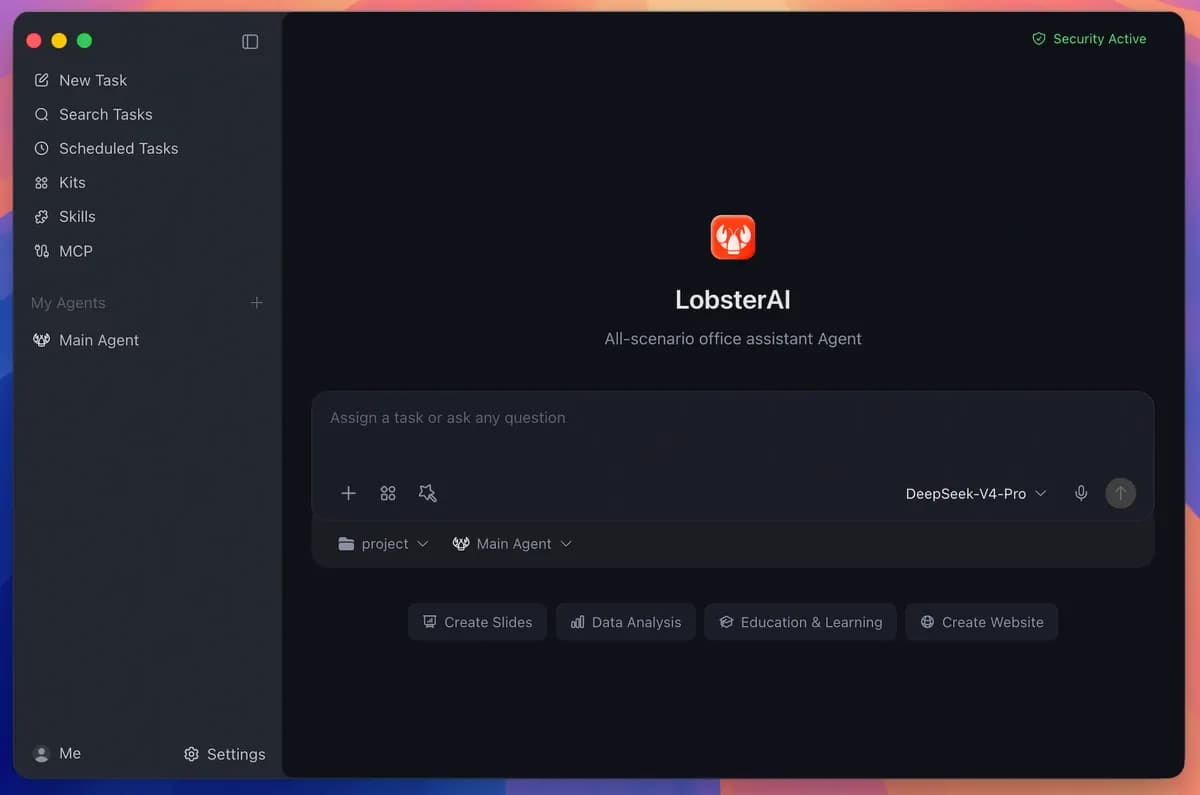
LobsterAI 是网易有道维护的桌面 Agent 应用,运行在真实本地工作环境中,可以处理文件、终端命令、浏览器流程、文档、表格、演示文稿以及项目工作区。桌面层负责会话、权限、界面状态、产物、记忆和 IM 绑定,底层通过 OpenClaw 执行 Agent 任务。
用户可以创建多个具有独立模型、技能、工作目录和 IM 绑定的 Agent,也可以安装场景化 Expert Kits。项目内置 28 个技能,覆盖网页搜索、Word、电子表格、PowerPoint、PDF、浏览器自动化、图像视频生成、邮件等,并支持继续接入 MCP Server。
敏感的文件、终端或网络操作需要经过权限确认;会话和应用数据保存在本地 SQLite。官方提供 macOS 与 Windows 安装包。
信息来源
每条信息都标注了状态与出处,可展开查看。
12 条 · 展开
信息来源
每条信息都标注了状态与出处,可展开查看。
capability tags
已核验automation、content_creation、productivity
来源: manual_curated · Manually curated from the verified project README; no AI draft. · 2026/8/17
editor note
已核验{"en":"The difference from a chat-only assistant is that long-running desktop sessions, permission gates, and local tool execution are already implemented as product features rather than only as an agent SDK. It is aimed at users who want an agent involved directly in files, Office documents, browser work, and scheduled tasks.","zh":"它和纯聊天助手的区别在于桌面端长期会话、权限控制和本地工具执行都已经被做成产品层,而不是只提供一个 Agent SDK。更适合希望让 Agent 直接参与文件、Office、浏览器和定时任务的桌面工作流。"}
来源: manual_curated · Manually curated from the verified project README; no AI draft. · 2026/8/17
how to use
已核验{"steps":[{"en":"Download the macOS or Windows installer from the LobsterAI website or GitHub Releases.","zh":"从 LobsterAI 官网或 GitHub Releases 下载 macOS 或 Windows 安装包。"},{"en":"Launch the application and configure the model and main agent you want to use.","zh":"启动应用并配置需要使用的模型与主 Agent。"},{"en":"Enable built-in skills, Expert Kits, or add MCP servers for the workflows you need.","zh":"根据任务启用内置 Skills、Expert Kits 或添加 MCP Server。"},{"en":"Run file, browser, or office tasks in a Cowork session and approve sensitive operations when prompted.","zh":"在 Cowork 会话中给出文件、浏览器或办公任务,并在敏感操作出现时确认权限。"}],"installAt":"local","difficulty":"easy"}
来源: manual_curated · Manually curated from the verified project README; no AI draft. · 2026/8/17
intro
已核验{"en":"LobsterAI is a desktop agent application maintained by NetEase Youdao. It operates inside the user’s local working environment and can work with files, terminal commands, browser workflows, documents, spreadsheets, presentations, and project workspaces. The desktop layer manages sessions, permissions, UI state, artifacts, memory, and IM bindings, while OpenClaw runs agent execution underneath.\n\nUsers can create multiple agents with separate model choices, skills, working directories, and IM bindings, or install scenario-oriented Expert Kits. The repository lists 28 built-in skills covering web search, Word documents, spreadsheets, PowerPoint, PDF processing, browser automation, media generation, email, and other tasks, with MCP servers available for additional tools and data sources.\n\nSensitive file, terminal, and network actions are permission-gated. Session and application data are stored locally in SQLite, and official installers are provided for macOS and Windows.","zh":"LobsterAI 是网易有道维护的桌面 Agent 应用,运行在真实本地工作环境中,可以处理文件、终端命令、浏览器流程、文档、表格、演示文稿以及项目工作区。桌面层负责会话、权限、界面状态、产物、记忆和 IM 绑定,底层通过 OpenClaw 执行 Agent 任务。\n\n用户可以创建多个具有独立模型、技能、工作目录和 IM 绑定的 Agent,也可以安装场景化 Expert Kits。项目内置 28 个技能,覆盖网页搜索、Word、电子表格、PowerPoint、PDF、浏览器自动化、图像视频生成、邮件等,并支持继续接入 MCP Server。\n\n敏感的文件、终端或网络操作需要经过权限确认;会话和应用数据保存在本地 SQLite。官方提供 macOS 与 Windows 安装包。"}
来源: manual_curated · Manually curated from the verified project README; no AI draft. · 2026/8/17
最新版本
已核验2026.9.23
来源: GitHub 官方接口 · latest_release=2026.9.23 · 2026/10/1
许可证
已核验MIT
来源: GitHub 官方接口 · license.spdx_id=MIT · 2026/10/1
一句话用途
已核验{"en":"A desktop agent for local files, terminal, browser, and office workflows with multi-agent setup, skills, MCP, scheduled tasks, and IM remote control.","zh":"可操作本地文件、终端、浏览器和办公文档的桌面 Agent,支持多 Agent、技能、MCP、定时任务与 IM 远程控制。"}
来源: manual_curated · Manually curated from the verified project README; no AI draft. · 2026/8/17
平台
已核验windows、macos
来源: manual_curated · Manually curated from the verified project README; no AI draft. · 2026/8/17
分类线索
根据材料推断ai-apps
来源: 项目说明文档 · hint=ai-apps · 2026/8/13
product forms
已核验desktop
来源: manual_curated · Manually curated from the verified project README; no AI draft. · 2026/8/17
role tags
已核验product、operations
来源: manual_curated · Manually curated from the verified project README; no AI draft. · 2026/8/17
supports local
已核验是
来源: manual_curated · Manually curated from the verified project README; no AI draft. · 2026/8/17
相关项目
根据分类、能力和适用角色匹配的其他已核验项目。
ragflow
基于深度文档解析与智能体能力的开源 RAG 引擎,用于构建具备可追溯引用的大模型上下文层。
ouroboros
Ouroboros 是一个开源、通用的自建构 AI 代理,具备跨任务和重启的持久记忆,能够自主协调专业代理集群并重写自身代码与架构。
sutando
一个在白天通过语音和屏幕交互响应任务、在夜间自主运行构建循环与自举演进的开源本地 AI 智能体。
hermes-agent
可在本机、VPS 或云环境运行的个人 AI Agent,支持终端、消息平台、记忆、技能和定时自动化。
project-pegaprox
面向 Proxmox VE 多集群的自托管管理面板,覆盖 VM/容器、监控、备份、权限、自动化和跨集群运维;XCP-ng 支持仍为 Tech Preview。
agentconnect
将各类 AI Agent 连接到 Slack、Discord、GitHub 等协作平台的多 Agent 调度平台。