mybolideDeveloper tools
Coding Tools MCP
coding-tools-mcp
Give any AI agent the ability to code
- Desktop
- macOS
- Runs locally
- Docker supported
- Popularity
- 432 Stars
- GitHub stars
- Recent activity
- 10/20/2026
- Updated in the last 30 days
- License
- Unknown
- No SPDX detected
Why it matters
We look beyond stars: what problem it solves, whether it creates real utility, and what makes its approach worth noticing.
Problem
Addresses the pain point of losing context when chat windows close and the difficulty of maintaining project state across multiple AI sessions.
Practical value
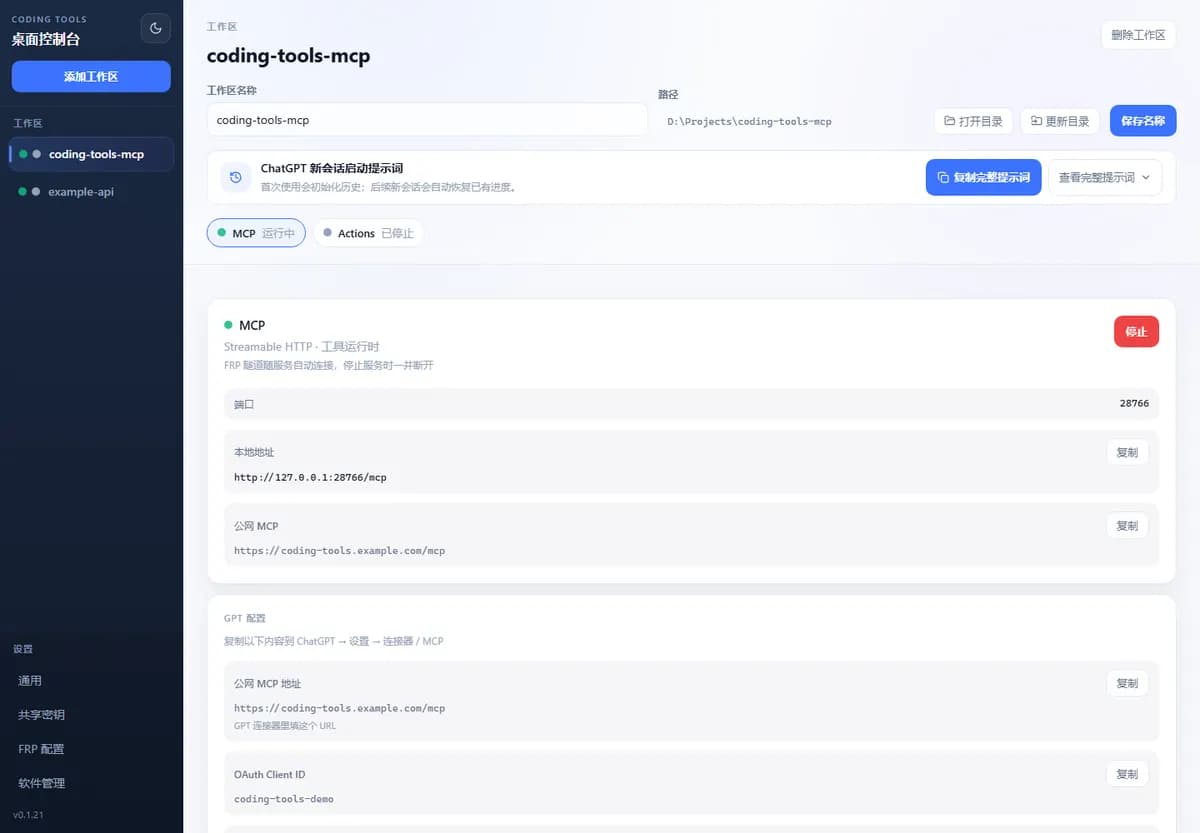
Provides a desktop client to manage multi-project workspaces, MCP services, public tunnels, and persistent session history, directly connecting external clients like ChatGPT.
Innovation / differentiation
Keeps development context tied to the codebase rather than a chat window by writing structured session history and checkpoints directly into the project directory.
Leverage potential
Integrates Rust and Tauri 2 to build a cross-platform desktop app with built-in FRP, Cloudflare tunnels, and auth management, lowering the barrier to exposing private MCP services.
Why now
Arrives during the rapid growth phase of the Model Context Protocol ecosystem, aligning with developer demand for securely connecting local projects to AI assistants.
Community activity
In the last 90 days there were 10 new issues and 10 pull requests; the bounded issue/PR samples include 10 issue authors and 8 PR contributors, with 6 releases.
Maintainer responsiveness
The 10-issue window sample had a 100% close rate, and the 10-pull-request sample had a 60% merge rate. Maintainer-response observations covered 100% of that issue sample, with a 90% response rate and median first response of 4 days.
Key highlights
- Real development: files, commands, Git, tests, and long-running processes are all in the same Workspace.
- Cross-session continuity: new conversations can read all history summaries and the latest handoff.
- Traceable progress: structured checkpoints can be saved after each task.
Quick start
How it is installed, how hard it is, and where to start.
Where it runs
Runs locally
Difficulty
Medium — some setup needed
- 01Download and install the desktop app
- 02Add a project directory
- 03Start MCP and public tunnel
- 04Copy the public MCP address
- 05Enable developer mode in ChatGPT
- 06Create a new MCP plugin and paste the address
- 07Complete authorization and start developing in a new conversation
Best for
- Developers who want to try it on their machine
- People who prefer Docker deploys
More about it
Coding Tools MCP is a Rust + Tauri 2 desktop app. After selecting a project directory and starting the service, an AI agent can use MCP to read files, modify code, run commands and tests, check Git status, and save key progress as in-project history sessions. It is closer to an "IDE workspace where AI remembers development progress"; ordinary development tools do not require creating a Task first, and history sessions are responsible for restoring context in new conversations.
Why it is needed
- Real development: files, commands, Git, tests, and long-running processes are all in the same Workspace.
- Cross-session development: New conversations can read all history summaries and the latest complete handoff, without repeatedly explaining project background and current progress to the AI.
- Traceable progress: Structured checkpoints can be saved after each task, leaving decisions, modifications, test results, and next steps in the project directory.
- Multi-workspace management: One desktop client can store multiple projects and manage their respective MCP, Actions, and public addresses.
- Direct ChatGPT connection: Built-in Streamable HTTP, OAuth, Bearer Token, OpenAPI, FRP, and Cloudflare tunnels.
- Simple default toolset: Stable core tools are available by default, and advanced Harness capabilities are opt-in.
Sources
Each field shows its status and source — expand to review.
9 · Expand
Sources
Each field shows its status and source — expand to review.
Latest release
Verifiedv0.2.4
Source: GitHub API · latest_release=v0.2.4 · 10/22/2026
needs api key
VerifiedNo
Source: admin_cms · cms editor · 8/7/2026
One-liner
Verified{"en":"Give any AI agent the ability to code","zh":"把本地项目变成 AI 可直接开发、能够跨会话延续上下文的持久工作区。"}
Source: admin_cms · cms editor · 8/7/2026
Platforms
Verifiedmacos
Source: admin_cms · cms editor · 8/7/2026
Category hint
Inferred from materialsAI Development Tools
Source: README.md · The project is described as a desktop app that gives AI agents coding capabilities, integrating with ChatGPT via MCP. · 8/7/2026
product forms
Verifieddesktop
Source: admin_cms · cms editor · 8/7/2026
supports docker
VerifiedYes
Source: Repository file · dockerfile=true; compose=true · 10/22/2026
supports local
VerifiedYes
Source: admin_cms · cms editor · 8/7/2026
supports self host
VerifiedNo
Source: admin_cms · cms editor · 8/7/2026
Related projects
Other verified projects matched by category, capabilities, and intended roles.
claude-code
An agentic coding tool for the terminal that understands codebases, handles routine development tasks, explains code, and works with Git workflows.
spec-kit
An open-source CLI toolkit for Spec-Driven Development that guides AI coding agents through structured specification, planning, and code generation steps.
llama.cpp
A lightweight LLM inference engine implemented in C/C++, supporting various hardware backends and model quantization.
graphify
Convert codebases, docs, and configs into a queryable knowledge graph for AI coding assistants
codex
OpenAI’s coding agent that runs locally, with terminal, IDE, and desktop-app entry points.
supabase
An open-source Postgres development platform offering auto-generated APIs, authentication, and real-time database subscriptions.